Description
< #Color Picker #Screen Eyedropper #Color Conversion #Design Tool #Portable #Cross-platform
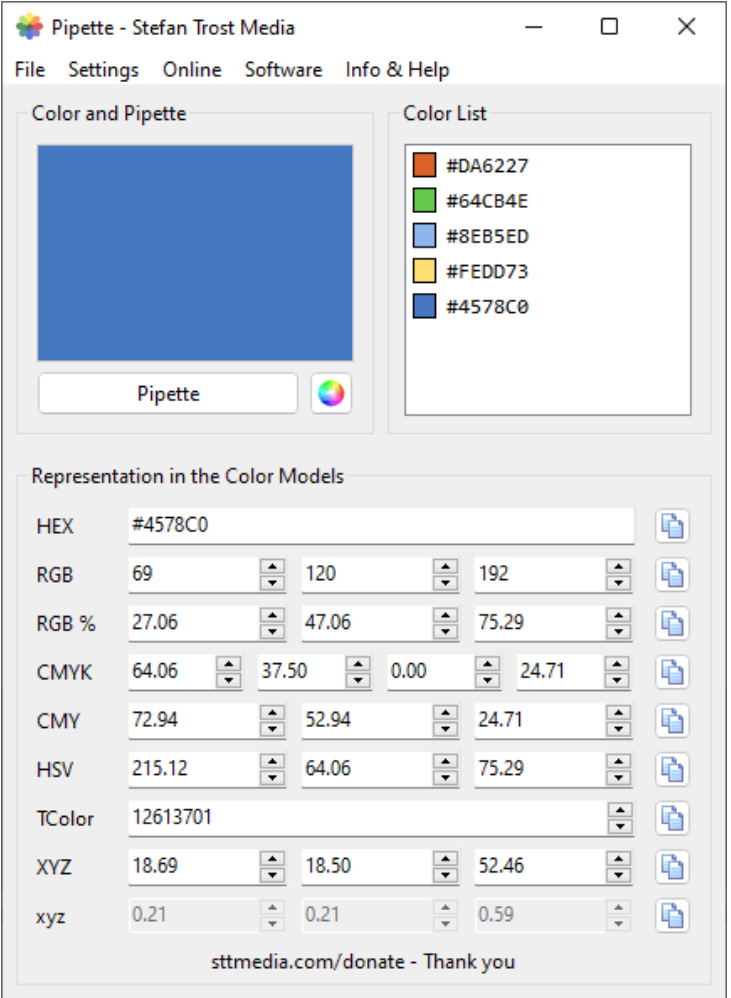
Pipette is a small screen color picker: move the mouse and it reads the color under the cursor in real time, click to lock that color into the color list, and convert it between color models afterwards. A color you like in some interface no longer needs a screenshot dragged into a design app to sample.
It outputs the formats designers actually use — HEX, RGB, CMY, CMYK, HSV, TColor and XYZ — and the copied value pastes straight into a graphics or web editor. The program needs no installation and runs on Windows, macOS and Linux, doing all its work locally.
Live picking: press the Pipette button and move the mouse; the color under the cursor appears in the color box and value fields immediately, and a click snaps it in place.
Many color models: the same color is shown as HEX, RGB, CMY, CMYK, HSV and more, with conversion between models available.
Color list: picked and generated colors are saved to a list, building a small palette you can return to and reselect later.
Magnifier: the pixels around the cursor can be enlarged so small icons and one-pixel lines can be targeted precisely without sampling the wrong spot.
Copy in one click: values go straight to the clipboard, sparing you from transcribing a hex string by hand.
Keyboard shortcuts: picking can be triggered by hotkeys, which are configurable, cutting down on clicking.
Cross-platform: Windows, macOS and Linux builds are available and behave the same way.
Portable: small and quick to start, usable without installation, and light enough to leave running.
Local only: everything happens on your machine — no screen content is uploaded and no picked values are collected.
Pipette is a small screen color picker: move the mouse and it reads the color under the cursor in real time, click to lock that color into the color list, and convert it between color models afterwards. A color you like in some interface no longer needs a screenshot dragged into a design app to sample.
It outputs the formats designers actually use — HEX, RGB, CMY, CMYK, HSV, TColor and XYZ — and the copied value pastes straight into a graphics or web editor. The program needs no installation and runs on Windows, macOS and Linux, doing all its work locally.
Features
Live picking: press the Pipette button and move the mouse; the color under the cursor appears in the color box and value fields immediately, and a click snaps it in place.
Many color models: the same color is shown as HEX, RGB, CMY, CMYK, HSV and more, with conversion between models available.
Color list: picked and generated colors are saved to a list, building a small palette you can return to and reselect later.
Magnifier: the pixels around the cursor can be enlarged so small icons and one-pixel lines can be targeted precisely without sampling the wrong spot.
Copy in one click: values go straight to the clipboard, sparing you from transcribing a hex string by hand.
Keyboard shortcuts: picking can be triggered by hotkeys, which are configurable, cutting down on clicking.
Cross-platform: Windows, macOS and Linux builds are available and behave the same way.
Portable: small and quick to start, usable without installation, and light enough to leave running.
Local only: everything happens on your machine — no screen content is uploaded and no picked values are collected.