Description
Tracking down one problem on a server usually means four or five things open at once: an SSH client for the box, a database client for the data, an SFTP tool for files, a monitoring page for load, and occasionally a remote desktop. Each keeps its own copy of the connection details, so changing a jump host means editing them all, and the window-switching starts to cost more than the work.
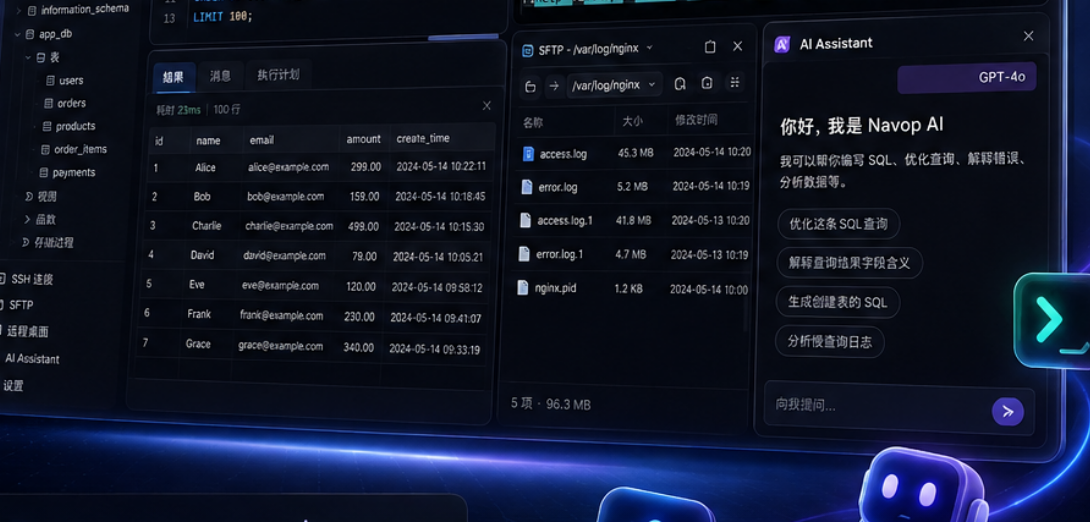
Navop pulls these into one native client: databases, SSH, SFTP, terminals, serial, port forwarding, server monitoring and remote desktop sit side by side in a single window, with one set of connection details per machine.
Database coverage is where it stands out — MySQL, PostgreSQL, Redis, MongoDB, Oracle, SQL Server, ClickHouse, SQLite and DuckDB, plus the Chinese domestic engines Dameng, KingBase and openGauss and the time-series database IoTDB, which few clients bother with. Remote desktop runs over RDP and VNC; on Windows it embeds the system’s own RDP control directly in a tab, while other platforms render through a pure-Rust implementation.
The interface itself is drawn natively with Rust and GPU rendering rather than wrapped in a WebView, so a pile of open tabs does not bog it down.
Read the licensing carefully: the source is Apache-2.0 but carries an additional supplementary licence permitting free redistribution through free channels while prohibiting commercial resale, charging fees, competing products or services, and paid distribution platforms. Personal use is fine; building a business on it needs a look at the terms first.
Multi-database client: Relational, key-value, document, columnar and time-series engines all connect, with result grids, execution plans and DDL generation handled in the same interface.
SSH and terminals: SSH sessions, SFTP transfers, serial connections and port forwarding live in the client, and existing SecureCRT session configurations can be imported.
Remote desktop: RDP and VNC are supported; on Windows the native RDP control is embedded (in a tab, in a fullscreen window, or by launching mstsc directly), while other platforms render through a pure-Rust IronRDP backend.
Server monitoring: Resource usage for a connected machine is visible in the app, without opening a separate monitoring page.
AI assistant: A built-in panel helps write SQL, optimise queries, explain errors and analyse slow-query logs, with the results tried against the connection you are already on.
Extension marketplace: Database drivers, remote desktop providers, document renderers, connection importers and external editors install as extensions, so you carry only what you use.
Builds for all three platforms: macOS (DMG and tar.gz, Apple silicon and Intel), Windows (MSI, EXE and a portable ZIP) and Linux (tar.gz, deb, rpm and AppImage).
Navop pulls these into one native client: databases, SSH, SFTP, terminals, serial, port forwarding, server monitoring and remote desktop sit side by side in a single window, with one set of connection details per machine.
Database coverage is where it stands out — MySQL, PostgreSQL, Redis, MongoDB, Oracle, SQL Server, ClickHouse, SQLite and DuckDB, plus the Chinese domestic engines Dameng, KingBase and openGauss and the time-series database IoTDB, which few clients bother with. Remote desktop runs over RDP and VNC; on Windows it embeds the system’s own RDP control directly in a tab, while other platforms render through a pure-Rust implementation.
The interface itself is drawn natively with Rust and GPU rendering rather than wrapped in a WebView, so a pile of open tabs does not bog it down.
Read the licensing carefully: the source is Apache-2.0 but carries an additional supplementary licence permitting free redistribution through free channels while prohibiting commercial resale, charging fees, competing products or services, and paid distribution platforms. Personal use is fine; building a business on it needs a look at the terms first.
Features
Multi-database client: Relational, key-value, document, columnar and time-series engines all connect, with result grids, execution plans and DDL generation handled in the same interface.
SSH and terminals: SSH sessions, SFTP transfers, serial connections and port forwarding live in the client, and existing SecureCRT session configurations can be imported.
Remote desktop: RDP and VNC are supported; on Windows the native RDP control is embedded (in a tab, in a fullscreen window, or by launching mstsc directly), while other platforms render through a pure-Rust IronRDP backend.
Server monitoring: Resource usage for a connected machine is visible in the app, without opening a separate monitoring page.
AI assistant: A built-in panel helps write SQL, optimise queries, explain errors and analyse slow-query logs, with the results tried against the connection you are already on.
Extension marketplace: Database drivers, remote desktop providers, document renderers, connection importers and external editors install as extensions, so you carry only what you use.
Builds for all three platforms: macOS (DMG and tar.gz, Apple silicon and Intel), Windows (MSI, EXE and a portable ZIP) and Linux (tar.gz, deb, rpm and AppImage).