
Description
Vim is a keyboard-driven text editor whose defining trait is that it is modal: in normal mode every letter key is an editing command, and you switch to insert mode only when you actually want to type text. That design keeps your hands on the home row — deleting a block, changing a word, jumping to a line are each a couple of keystrokes.
It does take a while to learn, but it runs on nearly any machine you touch: a server, a container, somebody else’s computer — type vim and you are editing, and your configuration and plugins travel with you. For code, config files and log wrangling, mouse-driven editing struggles to keep up once the habits are in place.
Modal editing: Normal, insert, visual and command-line modes each have their job, and operators combine freely with motions — "delete up to the next bracket" is one composed action rather than a special command.
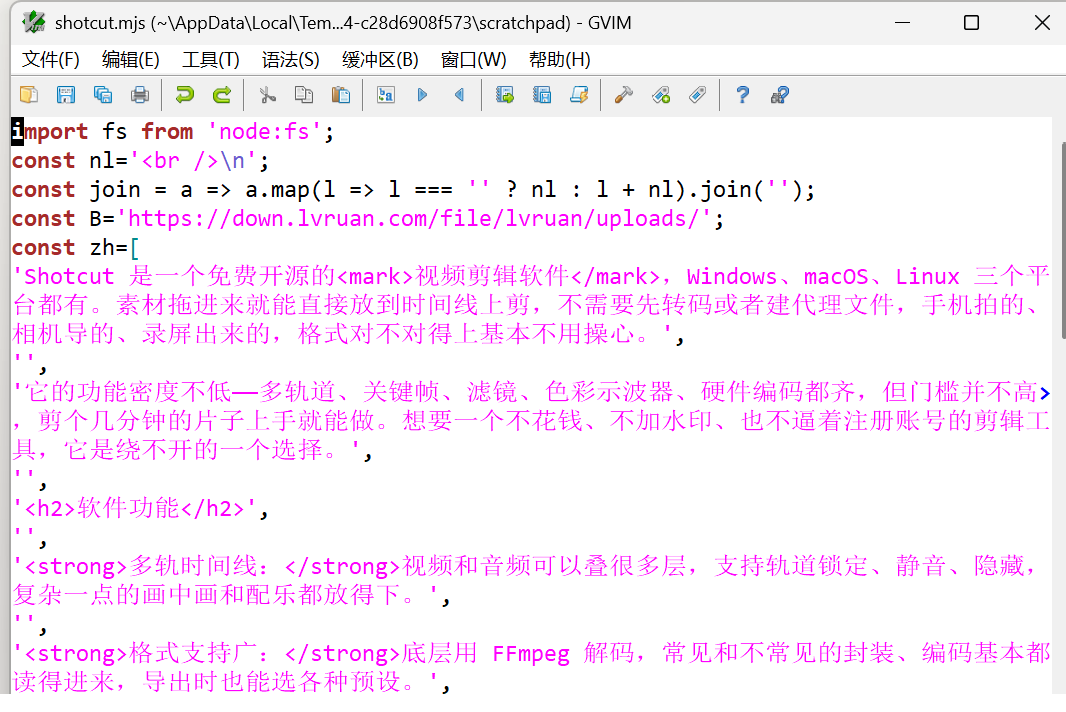
Syntax highlighting: Highlighting rules ship for hundreds of languages and file formats, colour schemes are swappable, and both the terminal and the GUI honour them.
Splits and tabs: Divide one window into several editing areas horizontally or vertically, or open tab pages, which makes working across a few files side by side straightforward.
Macros and registers: Record a sequence of operations and replay it over hundreds of lines, and keep several cut buffers apart in named registers.
Plugin ecosystem: Third-party plugins cover completion, file trees, Git integration and language servers, and carrying your config over reproduces the same environment on a new machine.
Terminal and GUI: It runs in a plain terminal, and on Windows there is gvim with menus and a toolbar, which makes the transition gentler if you are used to a mouse.
It does take a while to learn, but it runs on nearly any machine you touch: a server, a container, somebody else’s computer — type vim and you are editing, and your configuration and plugins travel with you. For code, config files and log wrangling, mouse-driven editing struggles to keep up once the habits are in place.
Features
Modal editing: Normal, insert, visual and command-line modes each have their job, and operators combine freely with motions — "delete up to the next bracket" is one composed action rather than a special command.
Syntax highlighting: Highlighting rules ship for hundreds of languages and file formats, colour schemes are swappable, and both the terminal and the GUI honour them.
Splits and tabs: Divide one window into several editing areas horizontally or vertically, or open tab pages, which makes working across a few files side by side straightforward.
Macros and registers: Record a sequence of operations and replay it over hundreds of lines, and keep several cut buffers apart in named registers.
Plugin ecosystem: Third-party plugins cover completion, file trees, Git integration and language servers, and carrying your config over reproduces the same environment on a new machine.
Terminal and GUI: It runs in a plain terminal, and on Windows there is gvim with menus and a toolbar, which makes the transition gentler if you are used to a mouse.
Screenshots
Tags:Code Editor