Description
#Automation Tool #Task Scheduler #Scheduled Tasks #Efficiency Tool #Portable Software #Windows
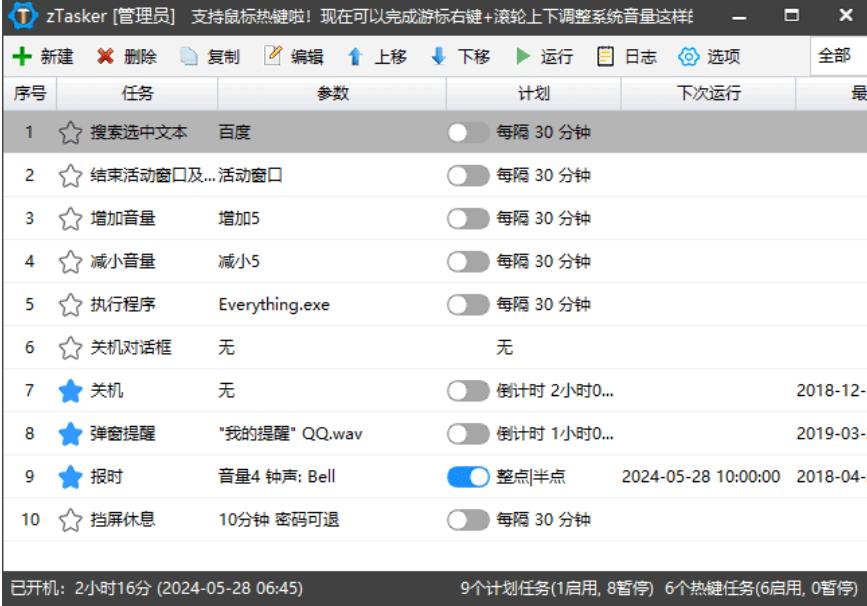
zTasker Portable is an automation task and scheduled task management tool designed for the Windows platform, capable of automatically executing specified operations based on user-defined times, conditions, or system events. Compared to the built-in Windows Task Scheduler, it offers a more intuitive interface and a rich variety of task types, making it suitable for tasks such as scheduled shutdowns, program execution, file processing, reminders, and various repetitive computer operations.
The portable version typically emphasizes no traditional installation required, just unzip and run, making it convenient to use in different directories. However, for specific portability methods and configuration file save locations, it is recommended to refer to the corresponding version's documentation.
Scheduled Tasks: Allows you to create automated tasks based on specified dates, times, or cycles, enabling the computer to automatically complete pre-set operations.
Program Auto-Execution: Supports automatically starting programs, scripts, or specified files based on task conditions, ideal for handling daily repetitive tasks.
System Operations: Can be used to execute shutdowns, restarts, logouts, locks, and other system-related tasks, facilitating scheduled management of the computer.
File Processing: Provides automation operations related to files and folders, allowing the software to handle some repetitive file processing workflows.
Task Triggers: In addition to conventional time triggers, zTasker offers various task triggering methods, allowing for more flexible automated workflows based on different conditions.
Task Combination: You can arrange multiple actions based on actual needs, allowing a series of operations to be executed automatically as set, reducing manual repetitive operations.
Reminder Function: Allows you to create scheduled reminder tasks for schedules, work, and reminders during computer usage.
Task Management: Manages created automation tasks through a unified interface, making it easy to view, adjust, and maintain different task rules.
Portable Flexibility: The portable version is more flexible to use, typically requiring no traditional installation process, suitable for users who wish to keep their systems tidy or need portable usage.
Official Website: https://www.everauto.net/
GitHub: https://github.com/holmesian/zTasker
The portable version typically emphasizes no traditional installation required, just unzip and run, making it convenient to use in different directories. However, for specific portability methods and configuration file save locations, it is recommended to refer to the corresponding version's documentation.
Software Features
Scheduled Tasks: Allows you to create automated tasks based on specified dates, times, or cycles, enabling the computer to automatically complete pre-set operations.
Program Auto-Execution: Supports automatically starting programs, scripts, or specified files based on task conditions, ideal for handling daily repetitive tasks.
System Operations: Can be used to execute shutdowns, restarts, logouts, locks, and other system-related tasks, facilitating scheduled management of the computer.
File Processing: Provides automation operations related to files and folders, allowing the software to handle some repetitive file processing workflows.
Task Triggers: In addition to conventional time triggers, zTasker offers various task triggering methods, allowing for more flexible automated workflows based on different conditions.
Task Combination: You can arrange multiple actions based on actual needs, allowing a series of operations to be executed automatically as set, reducing manual repetitive operations.
Reminder Function: Allows you to create scheduled reminder tasks for schedules, work, and reminders during computer usage.
Task Management: Manages created automation tasks through a unified interface, making it easy to view, adjust, and maintain different task rules.
Portable Flexibility: The portable version is more flexible to use, typically requiring no traditional installation process, suitable for users who wish to keep their systems tidy or need portable usage.
Download Links
Official Website: https://www.everauto.net/
GitHub: https://github.com/holmesian/zTasker