Description
On someone else machine, on a locked-down work laptop, or when you suddenly need a line of Japanese — installing a system input method for that, then uninstalling it afterwards, is more trouble than the task.
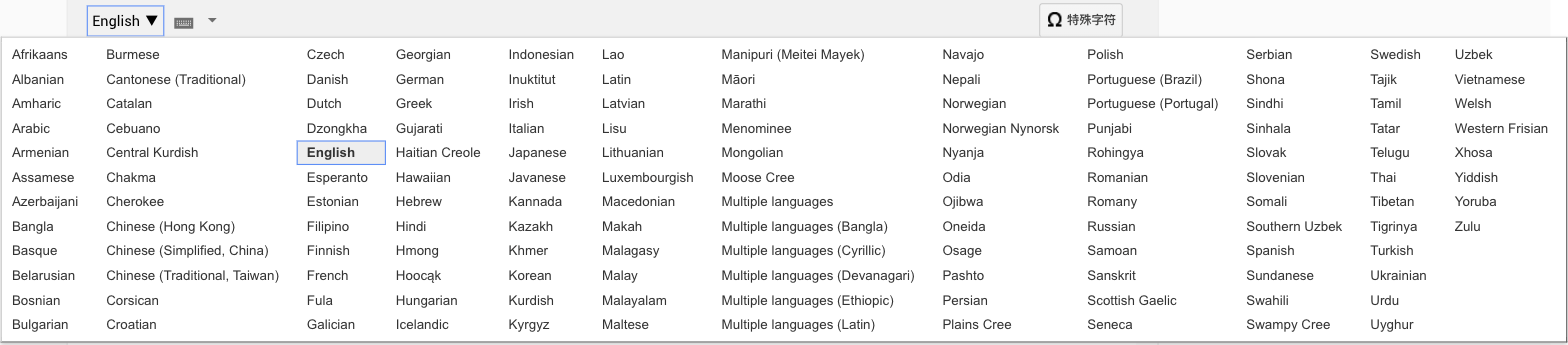
Google Input Tools moves the whole thing into the browser. Install the extension, tick the languages you want, and any text field on any page switches with one click. The input method runs inside the page and never touches system settings. It covers more than 90 languages and 300 input methods, including Pinyin, Japanese romaji and Hangul as well as transliteration for Hindi, Arabic and others, plus an on-screen keyboard and handwriting pad.
Hundreds of input methods: Over 90 languages and 300 methods, spanning CJK plus transliteration for Hindi, Arabic, Tamil and more.
Switch inside the page: The IME runs in the browser, so any input field switches with a click and system settings stay untouched.
On-screen keyboard: Shows the target language layout and lets you click characters your physical keyboard does not have.
Handwriting input: Draw a character you cannot spell with the mouse and pick it from the candidates.
Learns your usage: Candidate order adapts to what you actually pick, so frequent words rise to the front over time.
Google Input Tools moves the whole thing into the browser. Install the extension, tick the languages you want, and any text field on any page switches with one click. The input method runs inside the page and never touches system settings. It covers more than 90 languages and 300 input methods, including Pinyin, Japanese romaji and Hangul as well as transliteration for Hindi, Arabic and others, plus an on-screen keyboard and handwriting pad.
Features
Hundreds of input methods: Over 90 languages and 300 methods, spanning CJK plus transliteration for Hindi, Arabic, Tamil and more.
Switch inside the page: The IME runs in the browser, so any input field switches with a click and system settings stay untouched.
On-screen keyboard: Shows the target language layout and lets you click characters your physical keyboard does not have.
Handwriting input: Draw a character you cannot spell with the mouse and pick it from the candidates.
Learns your usage: Candidate order adapts to what you actually pick, so frequent words rise to the front over time.