Description
Saving a video from the web usually means an ad-plastered online converter that opens three popups before it starts, or being told to use yt-dlp — which is a command line with a long string of flags and a documentation lookup just to pick a resolution.
ytDownloader wraps yt-dlp in a real interface: the same parsing engine underneath, driven entirely by clicking. Paste a link and the available qualities, formats and file sizes come back as a list you pick from. YouTube, Bilibili, TikTok and Instagram are all recognized, with official support claimed for hundreds of sites.
Open-source and free, on Windows, macOS and Linux, with a clean interface carrying no ads and no trackers.
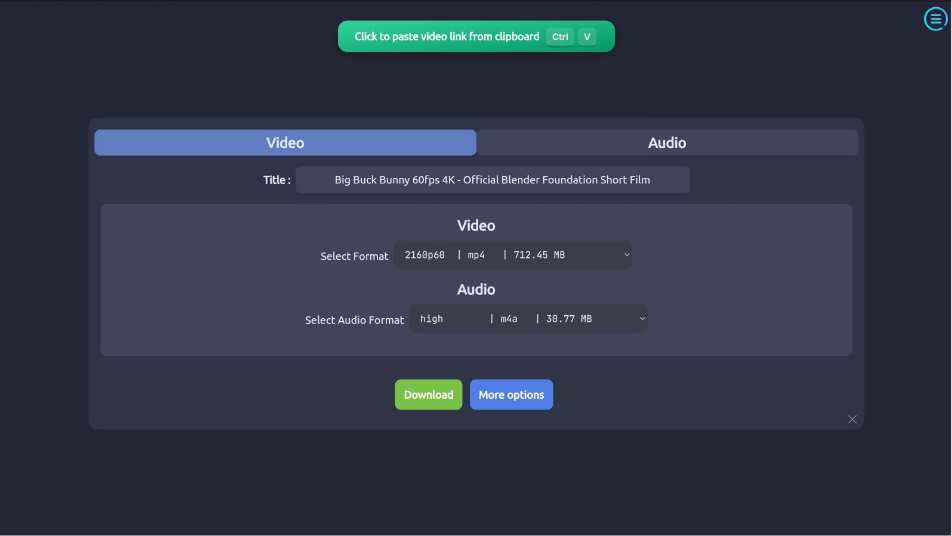
Paste and it resolves: copy a link, click paste from clipboard, and the selectable video and audio streams are listed with their sizes — 2160p60 mp4 at 712 MB, an m4a track at 39 MB — so nothing has to be guessed or looked up.
Audio only when that is all you want: video and audio sit in separate tabs, so pulling a soundtrack, podcast or recorded lecture saves straight to m4a or mp3 without downloading the full video and converting it yourself.
Whole playlists at once: a playlist or channel can be queued in one go instead of pasting links one at a time.
Subtitles and clips: subtitles can come down with the video, and a time range can be selected so a two-minute excerpt does not require pulling the entire episode.
Compress on the way out: ffmpeg-based compression is built in, so an oversized download can be shrunk inside the same app rather than in a separate transcoder.
Clean, themeable interface: no ad slots and no bundled recommendations, with several themes plus light and dark modes, and settings for proxy, speed limit and download folder.
ytDownloader wraps yt-dlp in a real interface: the same parsing engine underneath, driven entirely by clicking. Paste a link and the available qualities, formats and file sizes come back as a list you pick from. YouTube, Bilibili, TikTok and Instagram are all recognized, with official support claimed for hundreds of sites.
Open-source and free, on Windows, macOS and Linux, with a clean interface carrying no ads and no trackers.
Features
Paste and it resolves: copy a link, click paste from clipboard, and the selectable video and audio streams are listed with their sizes — 2160p60 mp4 at 712 MB, an m4a track at 39 MB — so nothing has to be guessed or looked up.
Audio only when that is all you want: video and audio sit in separate tabs, so pulling a soundtrack, podcast or recorded lecture saves straight to m4a or mp3 without downloading the full video and converting it yourself.
Whole playlists at once: a playlist or channel can be queued in one go instead of pasting links one at a time.
Subtitles and clips: subtitles can come down with the video, and a time range can be selected so a two-minute excerpt does not require pulling the entire episode.
Compress on the way out: ffmpeg-based compression is built in, so an oversized download can be shrunk inside the same app rather than in a separate transcoder.
Clean, themeable interface: no ad slots and no bundled recommendations, with several themes plus light and dark modes, and settings for proxy, speed limit and download folder.