Description
On Windows you tap Win and an arrow key and the window snaps to half the screen. macOS still has nothing quite like it — putting two windows side by side means dragging edges around by hand, which only gets worse as the display gets bigger, and the desktop ends up a pile of windows covering each other.
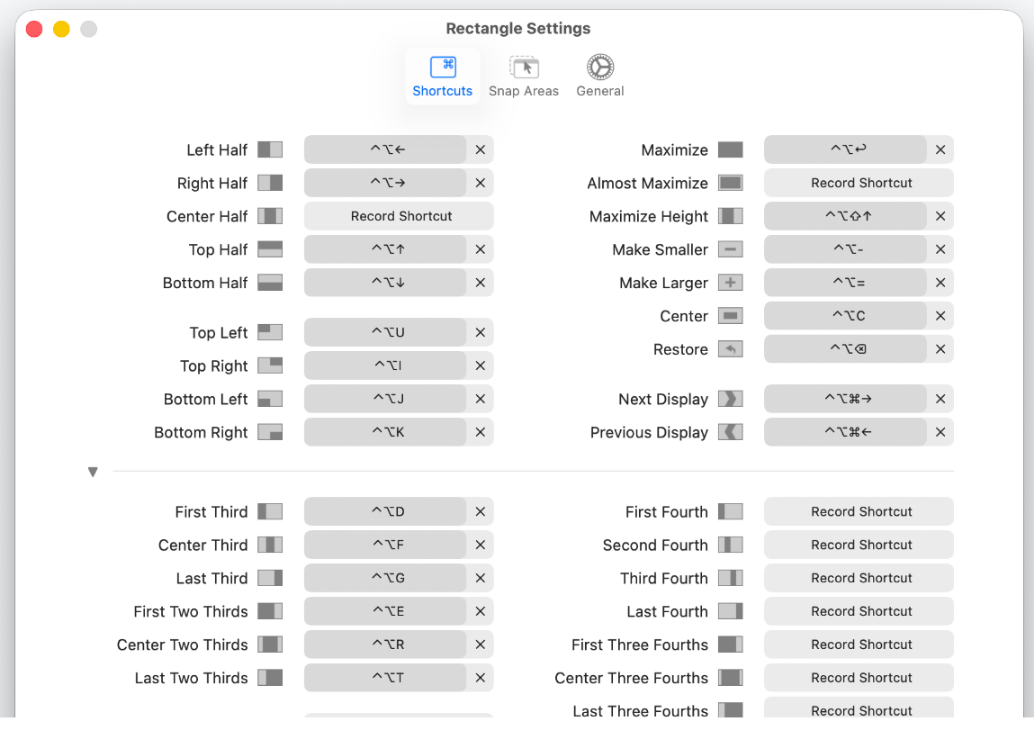
Rectangle fills that gap. Once installed, Ctrl+Option+arrow throws the current window to the left half, the right half, a corner, or full screen; you can also drag a window to a screen edge and let go to have it snap, which feels much like the Windows behaviour.
Its grid is finer than anything built into the system: beyond halves there are actions for thirds, quarters, sixths and ninths, so lining up three windows across an ultrawide is a single keystroke. With more than one display, one shortcut sends a window to the next screen.
It grew out of Spectacle, which is no longer maintained; the author rewrote it in Swift as a native macOS app under the MIT licence. (There is also a paid Rectangle Pro with more features, though the free version covers everyday use on its own.)
Keyboard layouts: Halves in all four directions, corners, maximize, almost-maximize, centre and restore, each with a rebindable shortcut.
Drag to snap: Pull a window to an edge or corner and release, and it takes that region — the option for when you would rather not memorise shortcuts.
Fine grid: Separate actions exist for thirds, quarters, sixths and ninths, which is what makes an ultrawide or a large display genuinely usable.
Multi-display moves: One shortcut throws a window to the next or previous screen, saving a long drag when an external monitor is attached.
Tidy everything: Tile or cascade all current windows in one go when the desktop has become a mess.
Command line control: Every action has a name and can be triggered from a terminal or a script, which lets it slot into your own automation.
Native and light: A native Swift app that lives in the menu bar, supporting macOS 10.15 and later on both Intel and Apple silicon.
Rectangle fills that gap. Once installed, Ctrl+Option+arrow throws the current window to the left half, the right half, a corner, or full screen; you can also drag a window to a screen edge and let go to have it snap, which feels much like the Windows behaviour.
Its grid is finer than anything built into the system: beyond halves there are actions for thirds, quarters, sixths and ninths, so lining up three windows across an ultrawide is a single keystroke. With more than one display, one shortcut sends a window to the next screen.
It grew out of Spectacle, which is no longer maintained; the author rewrote it in Swift as a native macOS app under the MIT licence. (There is also a paid Rectangle Pro with more features, though the free version covers everyday use on its own.)
Features
Keyboard layouts: Halves in all four directions, corners, maximize, almost-maximize, centre and restore, each with a rebindable shortcut.
Drag to snap: Pull a window to an edge or corner and release, and it takes that region — the option for when you would rather not memorise shortcuts.
Fine grid: Separate actions exist for thirds, quarters, sixths and ninths, which is what makes an ultrawide or a large display genuinely usable.
Multi-display moves: One shortcut throws a window to the next or previous screen, saving a long drag when an external monitor is attached.
Tidy everything: Tile or cascade all current windows in one go when the desktop has become a mess.
Command line control: Every action has a name and can be triggered from a terminal or a script, which lets it slot into your own automation.
Native and light: A native Swift app that lives in the menu bar, supporting macOS 10.15 and later on both Intel and Apple silicon.