Description
MD This Page is a browser extension that turns the page you are on into Markdown in one click. Pick it from the right-click menu and the ad slots, navigation and sidebar recommendations are stripped away, leaving the article body with its heading levels, lists, tables and links intact.
It is built mainly for handing web content to an AI. The old approach — select all, copy, paste into the chat box — loses the formatting: tables collapse into stray line breaks, heading levels become indistinguishable, and button labels and recommended links come along for the ride. As Markdown the structure is something a model can actually read, and it costs fewer tokens with less ambiguity. The preview shows roughly how many tokens and characters the result comes to, so you know what you are pasting.
Content extraction: It identifies the main body of the page and drops navigation, advertising and unrelated blocks while preserving the original hierarchy of headings, lists, tables, code blocks and links.
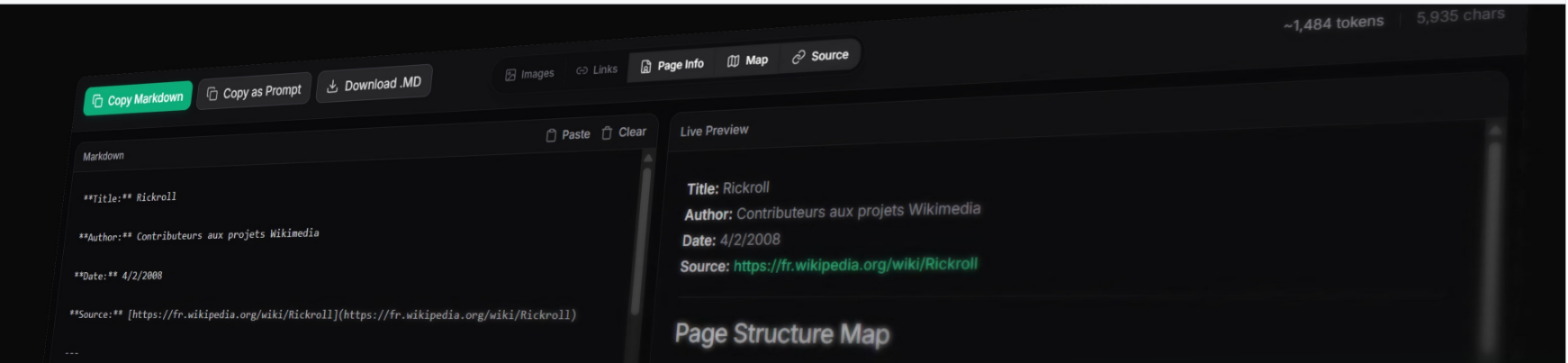
Three quick actions: Copy Markdown, Copy as Prompt and Download .md are available straight from the right-click menu or the toolbar icon, with no need to open the preview first.
Copy as prompt: The converted content is wrapped into a prompt ready to send to a model, saving you from writing the framing text each time.
Side-by-side preview: The preview tab shows Markdown source on the left and the rendered result on the right, so you can check before copying or adjusting.
Token and character counts: An approximate token count and character count sit above the result, which helps judge whether it will fit a model’s context.
Page analysis: Additional views cover page info, a structure map, image and link listings and the source, for understanding what the page is actually made of.
Chrome and Firefox: Extensions exist for both browsers, released under the MIT licence.
It is built mainly for handing web content to an AI. The old approach — select all, copy, paste into the chat box — loses the formatting: tables collapse into stray line breaks, heading levels become indistinguishable, and button labels and recommended links come along for the ride. As Markdown the structure is something a model can actually read, and it costs fewer tokens with less ambiguity. The preview shows roughly how many tokens and characters the result comes to, so you know what you are pasting.
Features
Content extraction: It identifies the main body of the page and drops navigation, advertising and unrelated blocks while preserving the original hierarchy of headings, lists, tables, code blocks and links.
Three quick actions: Copy Markdown, Copy as Prompt and Download .md are available straight from the right-click menu or the toolbar icon, with no need to open the preview first.
Copy as prompt: The converted content is wrapped into a prompt ready to send to a model, saving you from writing the framing text each time.
Side-by-side preview: The preview tab shows Markdown source on the left and the rendered result on the right, so you can check before copying or adjusting.
Token and character counts: An approximate token count and character count sit above the result, which helps judge whether it will fit a model’s context.
Page analysis: Additional views cover page info, a structure map, image and link listings and the source, for understanding what the page is actually made of.
Chrome and Firefox: Extensions exist for both browsers, released under the MIT licence.