
Description
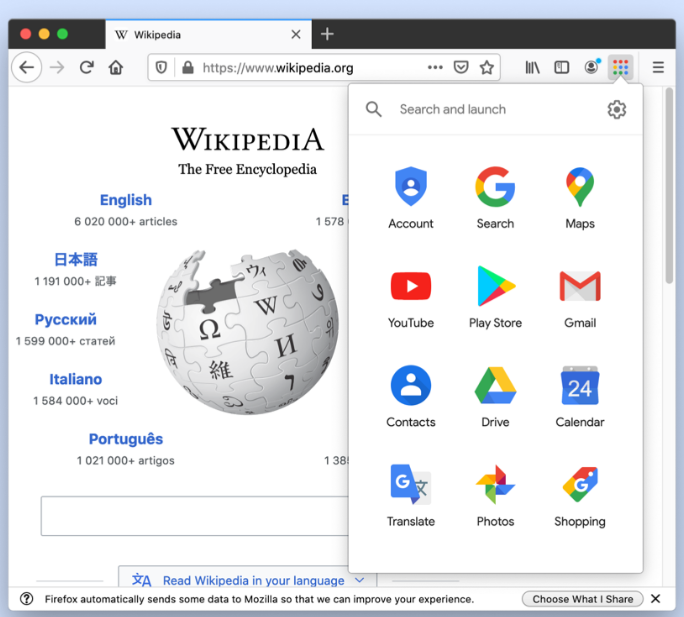
Shortcuts for Google — now called G App Launcher — is a browser extension that puts a grid button on the toolbar. Clicking it drops down a panel of Google service icons: Search, Gmail, Drive, Calendar, Maps, Photos, Translate and the rest, one click each.
Google’s own grid only appears on its own pages, so reaching another service while browsing elsewhere means going back to Google first. This extension moves that panel onto the browser toolbar, where it works on any page. Icons can be added, removed and reordered, and non-Google sites can go in too, which effectively turns it into a shortcut panel of your own making.
Available anywhere: The button lives on the toolbar, so whatever page you are on, one click takes you to the service you want.
Broad coverage: Over a thousand Google-related entry points are built in, including the less prominent products and sub-services.
Custom shortcuts: It is not limited to Google — any URL can be added as an icon, making the panel a personal navigation board.
Reorder and hide: Entries can be rearranged and unused ones hidden, keeping what you actually use at the front.
Search box: A search field at the top of the panel filters by name, which beats scanning visually once the list grows.
Multiple accounts: With several Google accounts signed in, you can pick which identity a service opens under.
Google’s own grid only appears on its own pages, so reaching another service while browsing elsewhere means going back to Google first. This extension moves that panel onto the browser toolbar, where it works on any page. Icons can be added, removed and reordered, and non-Google sites can go in too, which effectively turns it into a shortcut panel of your own making.
Features
Available anywhere: The button lives on the toolbar, so whatever page you are on, one click takes you to the service you want.
Broad coverage: Over a thousand Google-related entry points are built in, including the less prominent products and sub-services.
Custom shortcuts: It is not limited to Google — any URL can be added as an icon, making the panel a personal navigation board.
Reorder and hide: Entries can be rearranged and unused ones hidden, keeping what you actually use at the front.
Search box: A search field at the top of the panel filters by name, which beats scanning visually once the list grows.
Multiple accounts: With several Google accounts signed in, you can pick which identity a service opens under.
Screenshots
Tags:Browser Extension