
Description
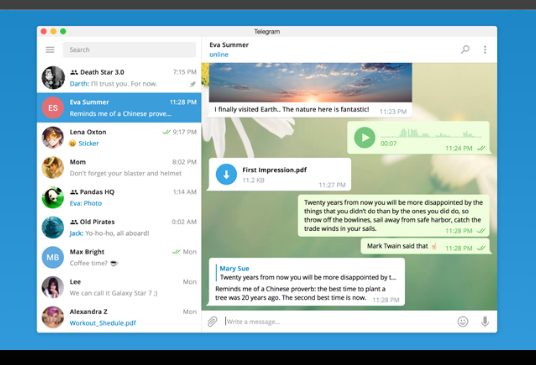
Telegram Desktop is Telegram’s official computer client. It is not a mirror of your phone but a full client you sign into separately — messages live in the cloud, so your entire history is there once you log in, and sending or receiving works with the phone switched off.
Typing on a computer is far quicker than on a phone, and handling busy groups, sending files and digging through old conversations are all easier on a big screen. A portable build is offered too, so it can travel on a USB stick.
Cloud sync: History is stored server-side, so any device you sign in on sees the full record — no pairing or transfer between devices required.
Large file transfers: The per-file size ceiling is generous, so installers, archives and untrimmed video go across directly instead of being split or routed through a file host.
Groups and channels: Large groups and broadcast-style channels are supported, and the admin controls — permissions, pinning, slow mode — are all reachable from the desktop.
Chat folders: Conversations can be sorted into tabs, keeping work, friends and subscribed channels apart instead of piling into one list.
Multiple accounts: Several accounts can be signed in at once in the same client and switched between with a click, with no logging out.
Portable build: The official site offers a no-install version that runs from its folder, carrying its settings and login with it.
Typing on a computer is far quicker than on a phone, and handling busy groups, sending files and digging through old conversations are all easier on a big screen. A portable build is offered too, so it can travel on a USB stick.
Features
Cloud sync: History is stored server-side, so any device you sign in on sees the full record — no pairing or transfer between devices required.
Large file transfers: The per-file size ceiling is generous, so installers, archives and untrimmed video go across directly instead of being split or routed through a file host.
Groups and channels: Large groups and broadcast-style channels are supported, and the admin controls — permissions, pinning, slow mode — are all reachable from the desktop.
Chat folders: Conversations can be sorted into tabs, keeping work, friends and subscribed channels apart instead of piling into one list.
Multiple accounts: Several accounts can be signed in at once in the same client and switched between with a click, with no logging out.
Portable build: The official site offers a no-install version that runs from its folder, carrying its settings and login with it.
Screenshots
Tags:Instant Messaging