Description
< #File Attributes #Timestamps #Batch Processing #Context Menu #Portable #Utility
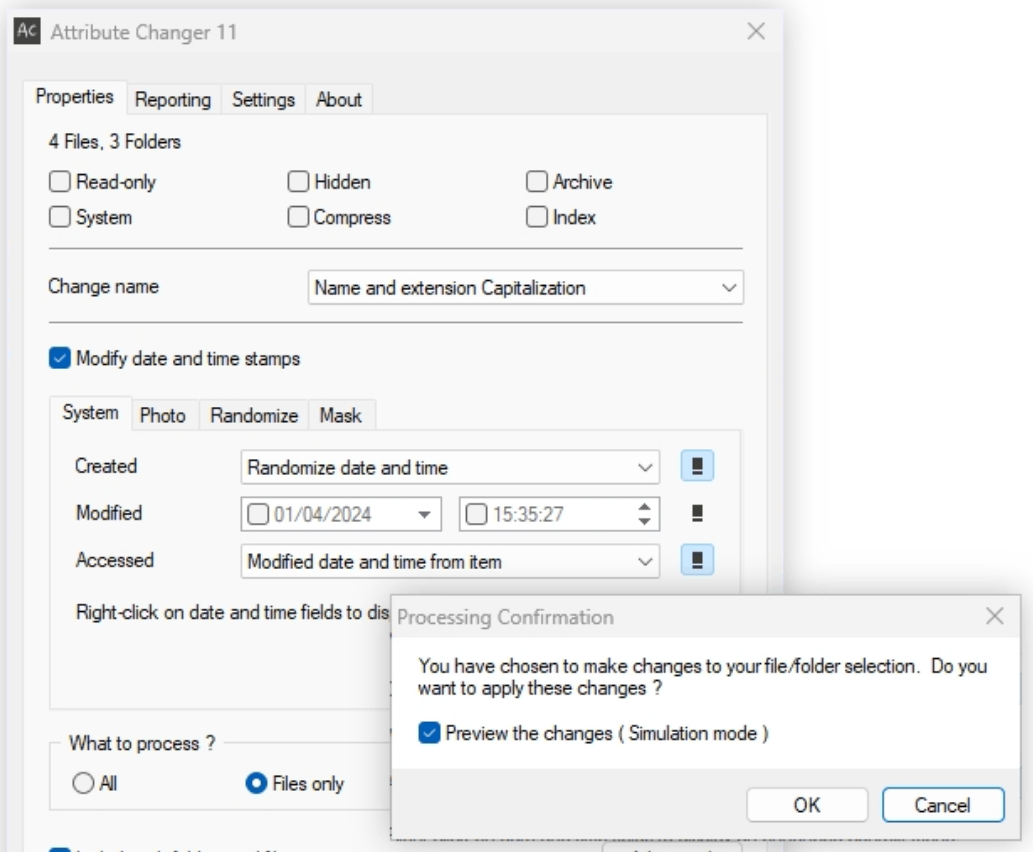
Attribute Changer edits the properties of files and folders — the read-only, hidden, system and archive flags, plus the created, modified and accessed timestamps. Tidying an archive, correcting dates on camera exports, or marking a batch of files read-only is far less work here than through commands.
It integrates into the Explorer context menu, so a right-click on a selection opens it, and files can also be dropped onto the main window. Batch work is its strength: recurse through a whole directory tree, filter targets by type, size, date range and wildcards, and tens of thousands of files are handled in one pass. A simulation mode shows what would change before anything does.
Attribute changes: toggle read-only, hidden, system, archive, compressed and indexed flags across a selection by ticking boxes.
Timestamp editing: set created, modified and last-accessed times precisely, randomize them by rule, or copy them from other fields.
Recursive batches: apply the same change to every subfolder and file beneath a chosen directory without descending into each one.
Conditional filters: narrow the target set by file type, size, date range and name so untouched files stay untouched.
Simulation mode: preview every pending change before execution and run it only once the list looks right.
Photo dates: photo timestamps can be handled specifically, which suits material exported from cameras and phones.
Filename case: names and extensions can be converted in batch to uppercase, lowercase or capitalized form.
Explorer integration: it lives in the context menu for the current selection and also accepts drag-and-drop.
Multilingual and portable: the interface supports many languages, and the build offered here is the portable one — unzip and run.
Attribute Changer edits the properties of files and folders — the read-only, hidden, system and archive flags, plus the created, modified and accessed timestamps. Tidying an archive, correcting dates on camera exports, or marking a batch of files read-only is far less work here than through commands.
It integrates into the Explorer context menu, so a right-click on a selection opens it, and files can also be dropped onto the main window. Batch work is its strength: recurse through a whole directory tree, filter targets by type, size, date range and wildcards, and tens of thousands of files are handled in one pass. A simulation mode shows what would change before anything does.
Features
Attribute changes: toggle read-only, hidden, system, archive, compressed and indexed flags across a selection by ticking boxes.
Timestamp editing: set created, modified and last-accessed times precisely, randomize them by rule, or copy them from other fields.
Recursive batches: apply the same change to every subfolder and file beneath a chosen directory without descending into each one.
Conditional filters: narrow the target set by file type, size, date range and name so untouched files stay untouched.
Simulation mode: preview every pending change before execution and run it only once the list looks right.
Photo dates: photo timestamps can be handled specifically, which suits material exported from cameras and phones.
Filename case: names and extensions can be converted in batch to uppercase, lowercase or capitalized form.
Explorer integration: it lives in the context menu for the current selection and also accepts drag-and-drop.
Multilingual and portable: the interface supports many languages, and the build offered here is the portable one — unzip and run.