Description
< #macOS #Disk Cleanup #System Data #Menu Bar App #Storage Space #Source Available
SysDataMenu is a macOS menu bar app built to answer one question: what is actually inside "System Data" in Storage settings. Finder drops everything it cannot attribute to an app, photos or documents into that bucket — simulator runtimes, Xcode symbol caches, package manager stores, virtual machine disks, the unified log, per-app data folders — and gives you no way to look inside. This app opens the bucket, lists it item by item, and deletes what can go.
It is not a cache cleaner: `~/Library/Caches` is one small line among fifty. It fits developers whose disk keeps filling up for no obvious reason, especially Macs carrying Xcode and a pile of simulators. Nothing you did not click ever gets deleted.
Menu bar total: the icon shows the size of everything the scan found — the number Storage settings calls System Data — scanning on launch and once a day, with results appearing as each location is measured so a slow first scan is never mistaken for a stuck one.
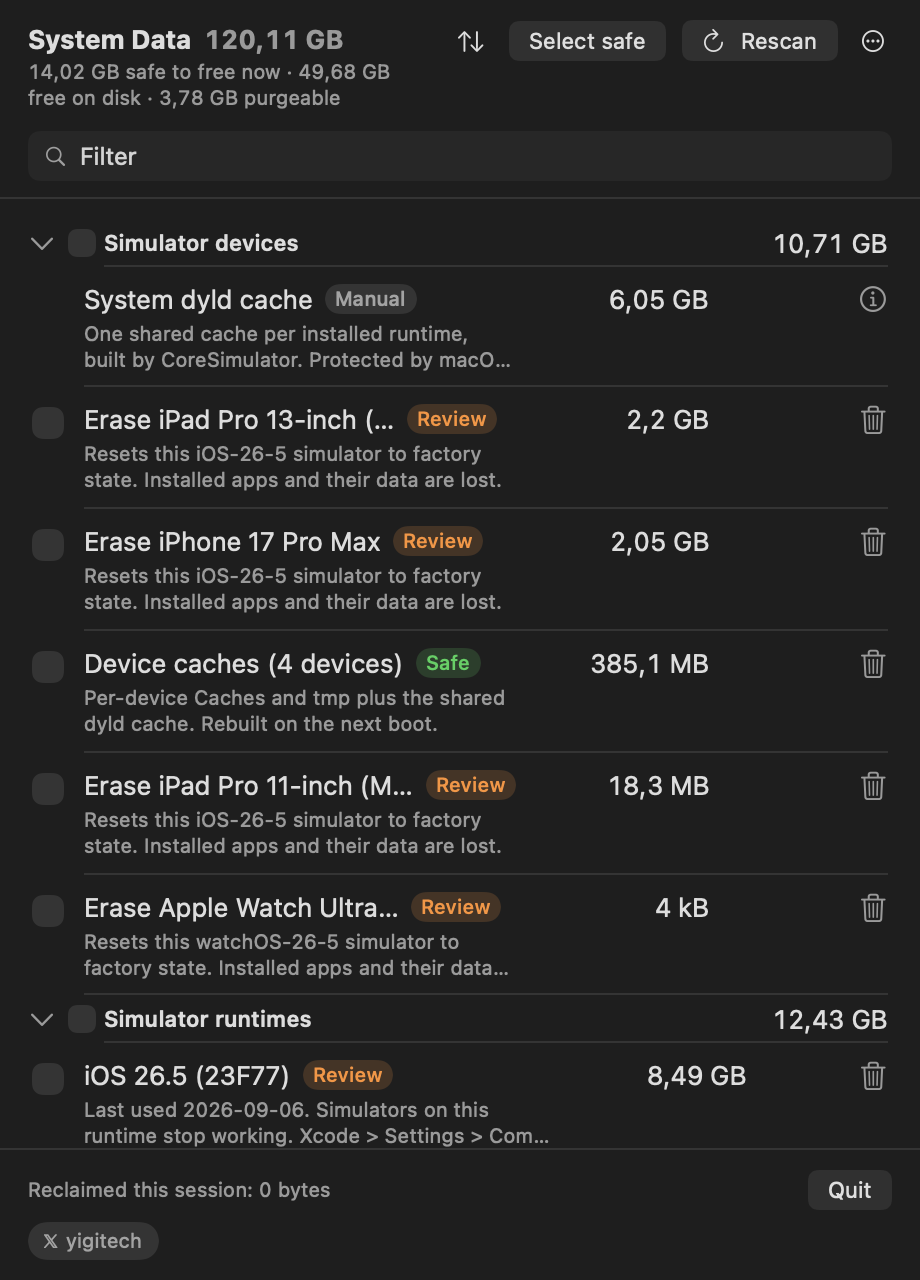
Real sizes with a risk badge: every size is measured on disk and labelled Safe, Review or Manual — safe items regenerate on their own, review items cost you something (a simulator, a login, a re-download), and manual items the app will not touch, showing the command or settings path instead.
Trash first: review items go to the Trash so a wrong click can be undone for 30 days, while safe items are deleted outright because they come back by themselves.
Read the command first: the confirmation shows every operation verbatim rather than a count of items, and a copy button puts the whole plan on the pasteboard for reading elsewhere.
Sort by idle time: rows untouched for more than a fortnight report how long they have sat there and can be sorted by it — a build folder from today and one from a project abandoned two years ago are the same bytes and opposite decisions.
History of what changed: each scan and deletion is written to a local file, so sizes come with growth figures and a history view can answer what came back, what grew most, and what you deleted; switch it off and the file is deleted, and nothing leaves the machine either way.
Filter and batch delete: a scan finds around 180 items across eighteen groups, filterable by name, description or group, with a select-safe control for everything regenerable on screen and a footer that says how many selected rows are off screen.
Clean install and removal: no privileged helper, no launch daemon and no kernel extension — root actions run as one-off osascript prompts, and the daily update check is off by default, leaving the app with no network traffic at all.
Source available: the source is published on GitHub so anyone can read what it does to their machine and build it with Xcode for personal use; the license is proprietary, so redistribution and public derivative works are not permitted.
SysDataMenu is a macOS menu bar app built to answer one question: what is actually inside "System Data" in Storage settings. Finder drops everything it cannot attribute to an app, photos or documents into that bucket — simulator runtimes, Xcode symbol caches, package manager stores, virtual machine disks, the unified log, per-app data folders — and gives you no way to look inside. This app opens the bucket, lists it item by item, and deletes what can go.
It is not a cache cleaner: `~/Library/Caches` is one small line among fifty. It fits developers whose disk keeps filling up for no obvious reason, especially Macs carrying Xcode and a pile of simulators. Nothing you did not click ever gets deleted.
Features
Menu bar total: the icon shows the size of everything the scan found — the number Storage settings calls System Data — scanning on launch and once a day, with results appearing as each location is measured so a slow first scan is never mistaken for a stuck one.
Real sizes with a risk badge: every size is measured on disk and labelled Safe, Review or Manual — safe items regenerate on their own, review items cost you something (a simulator, a login, a re-download), and manual items the app will not touch, showing the command or settings path instead.
Trash first: review items go to the Trash so a wrong click can be undone for 30 days, while safe items are deleted outright because they come back by themselves.
Read the command first: the confirmation shows every operation verbatim rather than a count of items, and a copy button puts the whole plan on the pasteboard for reading elsewhere.
Sort by idle time: rows untouched for more than a fortnight report how long they have sat there and can be sorted by it — a build folder from today and one from a project abandoned two years ago are the same bytes and opposite decisions.
History of what changed: each scan and deletion is written to a local file, so sizes come with growth figures and a history view can answer what came back, what grew most, and what you deleted; switch it off and the file is deleted, and nothing leaves the machine either way.
Filter and batch delete: a scan finds around 180 items across eighteen groups, filterable by name, description or group, with a select-safe control for everything regenerable on screen and a footer that says how many selected rows are off screen.
Clean install and removal: no privileged helper, no launch daemon and no kernel extension — root actions run as one-off osascript prompts, and the daily update check is off by default, leaving the app with no network traffic at all.
Source available: the source is published on GitHub so anyone can read what it does to their machine and build it with Xcode for personal use; the license is proprietary, so redistribution and public derivative works are not permitted.