Description
< #Menu Bar Manager #macOS #System Utility #Icon Hiding #Swift #No Ads #Open Source
Pelmet is a menu bar manager written specifically for macOS 27. It tucks away the icons you rarely need and slides them back on a hover, a click or a keyboard shortcut. Apple rebuilt the menu bar from the ground up in macOS 27, which is why Bartender, Ice and the other managers built on the old architecture stop working there. Pelmet was written for the new architecture from day one, so hiding involves no overlay windows, no fake bars and no icons jumping around as the bar reflows.
It works by driving the hiding mechanism macOS 27 already has — the same one behind the system's assessment lockdown mode. Pelmet asserts which icons should stay, and the system hides and reflows the rest itself. The catch is that this interface lives in a private Apple framework, undocumented and unguaranteed, so Pelmet resolves it at runtime and fails soft: if a future update removes it, Pelmet reports hiding as unavailable instead of breaking your menu bar. Everything else uses public APIs. Written in Swift and SwiftUI under GPL-3.0, installable as a DMG or through Homebrew, and asking for a single Accessibility permission.
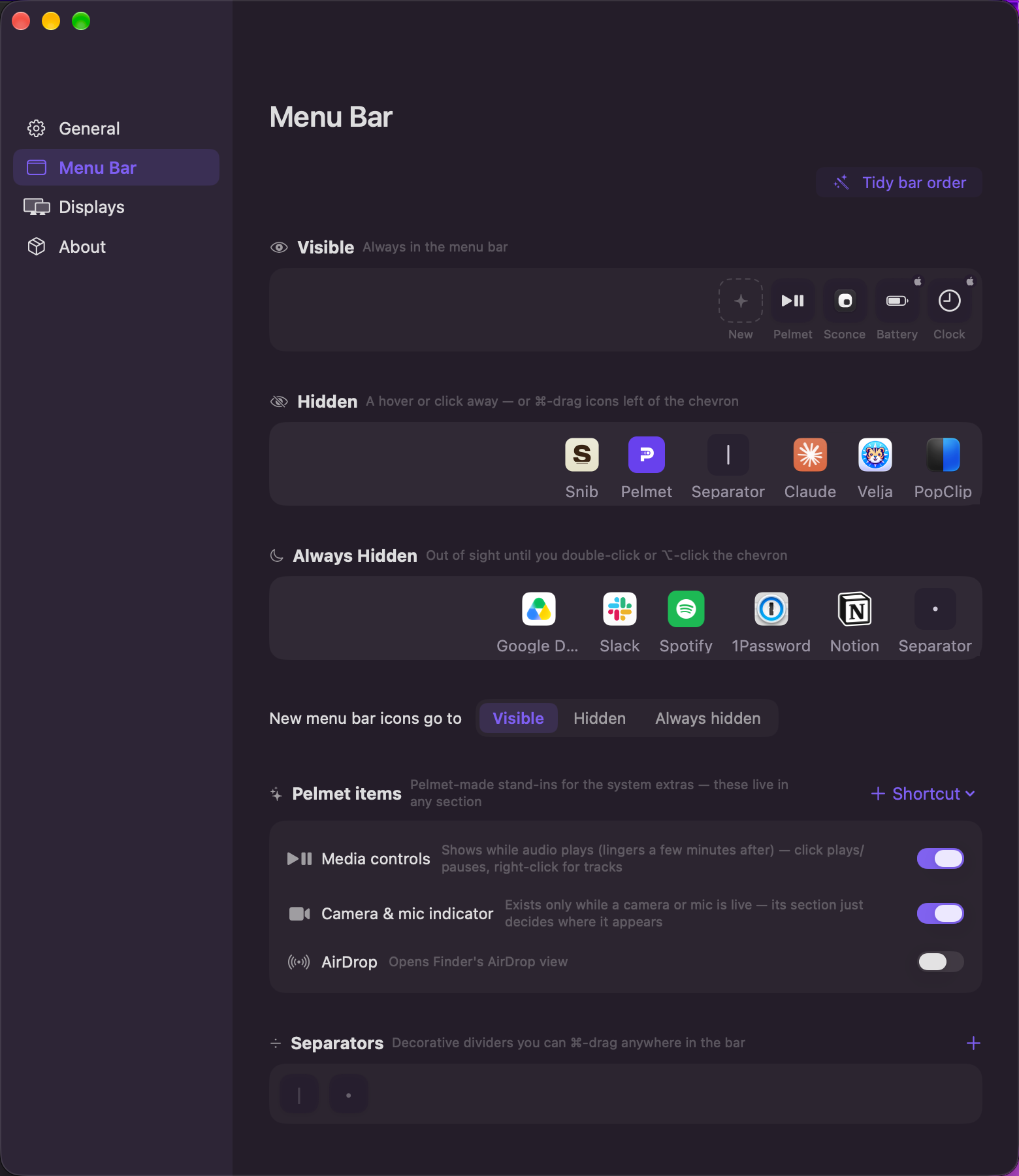
Three sections:Icons split into Visible, Hidden and Always Hidden — Visible always stays, Hidden returns on a hover or click, and Always Hidden appears only on a double-click or an Option-click of the chevron.
Layout editor:A drag-and-drop editor with real app-icon previews, or skip the window entirely and Command-drag icons across the chevron right in the menu bar; Pelmet adopts either change.
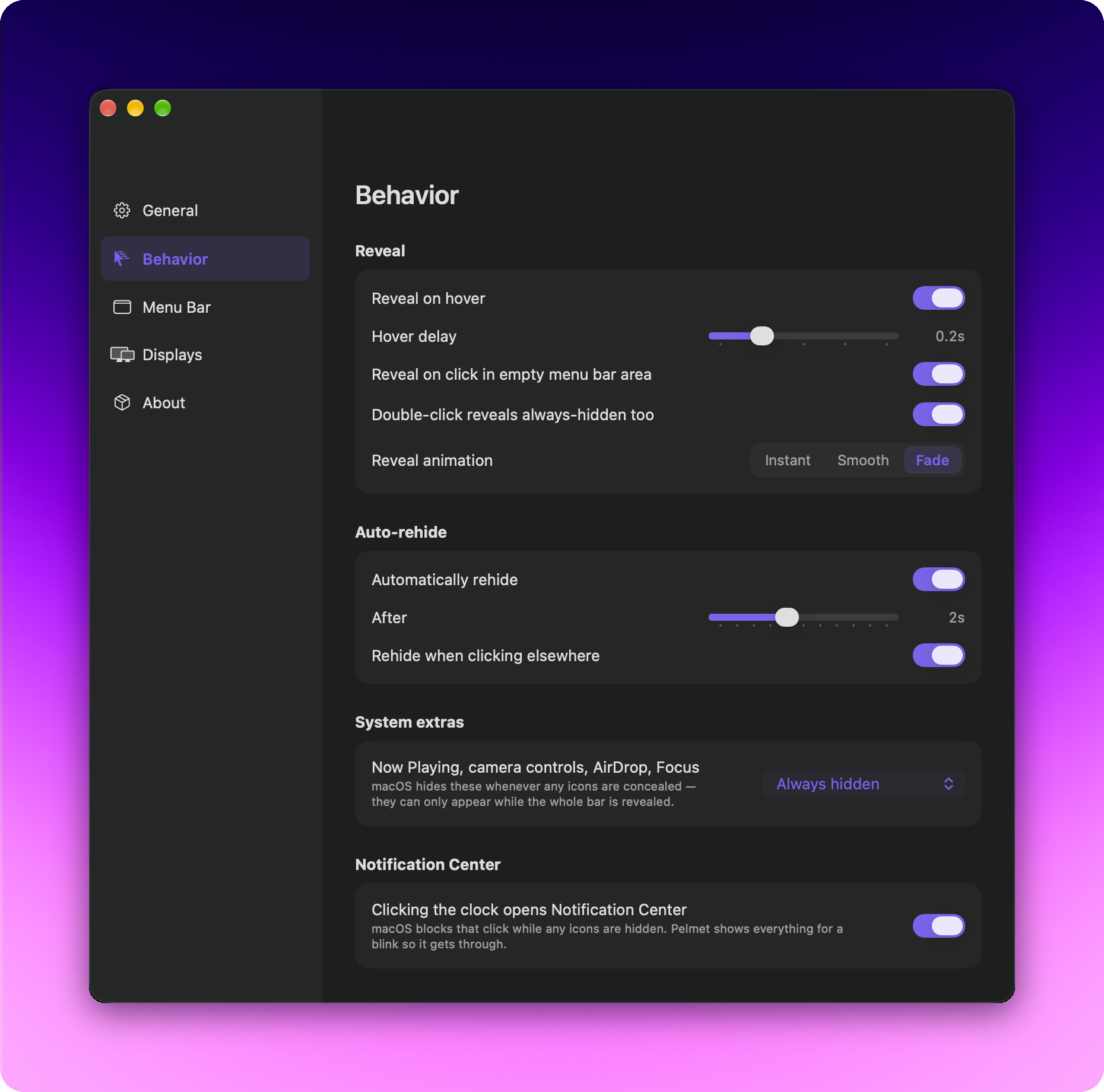
Reveal rules:Hover with a delay from 0.1 to 0.5 seconds, a click on empty bar space, a double-click, or the chevron itself — each one its own toggle, with Instant, Smooth or Fade animation and rehiding either on a timer or the moment you click elsewhere.
Per-display behaviour:Set each screen to show everything or to collapse, and whichever display your pointer sits on decides the rule.
Built-in replacements:Because macOS temporarily removes its own extras while hiding is active, Pelmet ships stand-ins for media controls, AirDrop, the camera and microphone indicator, and Shortcuts items.
Icon styles and separators:Six menu bar icon styles — chevron, arrow, eye, dots, grid, panel — or no icon at all, plus visual separators with adjustable opacity that drag around like any other item.
No accounts, no telemetry:There is no account, no analytics and no server; the only connection it makes is an update check, delivered through Sparkle with EdDSA signature verification. The interface ships in ten languages.
Open source:The source code is hosted on GitHub, so developers can study the implementation, contribute, or adapt it to their own needs.
Pelmet is a menu bar manager written specifically for macOS 27. It tucks away the icons you rarely need and slides them back on a hover, a click or a keyboard shortcut. Apple rebuilt the menu bar from the ground up in macOS 27, which is why Bartender, Ice and the other managers built on the old architecture stop working there. Pelmet was written for the new architecture from day one, so hiding involves no overlay windows, no fake bars and no icons jumping around as the bar reflows.
It works by driving the hiding mechanism macOS 27 already has — the same one behind the system's assessment lockdown mode. Pelmet asserts which icons should stay, and the system hides and reflows the rest itself. The catch is that this interface lives in a private Apple framework, undocumented and unguaranteed, so Pelmet resolves it at runtime and fails soft: if a future update removes it, Pelmet reports hiding as unavailable instead of breaking your menu bar. Everything else uses public APIs. Written in Swift and SwiftUI under GPL-3.0, installable as a DMG or through Homebrew, and asking for a single Accessibility permission.
Features
Three sections:Icons split into Visible, Hidden and Always Hidden — Visible always stays, Hidden returns on a hover or click, and Always Hidden appears only on a double-click or an Option-click of the chevron.
Layout editor:A drag-and-drop editor with real app-icon previews, or skip the window entirely and Command-drag icons across the chevron right in the menu bar; Pelmet adopts either change.
Reveal rules:Hover with a delay from 0.1 to 0.5 seconds, a click on empty bar space, a double-click, or the chevron itself — each one its own toggle, with Instant, Smooth or Fade animation and rehiding either on a timer or the moment you click elsewhere.
Per-display behaviour:Set each screen to show everything or to collapse, and whichever display your pointer sits on decides the rule.
Built-in replacements:Because macOS temporarily removes its own extras while hiding is active, Pelmet ships stand-ins for media controls, AirDrop, the camera and microphone indicator, and Shortcuts items.
Icon styles and separators:Six menu bar icon styles — chevron, arrow, eye, dots, grid, panel — or no icon at all, plus visual separators with adjustable opacity that drag around like any other item.
No accounts, no telemetry:There is no account, no analytics and no server; the only connection it makes is an update check, delivered through Sparkle with EdDSA signature verification. The interface ships in ten languages.
Open source:The source code is hosted on GitHub, so developers can study the implementation, contribute, or adapt it to their own needs.