Description
< #SSH #Remote Ops #Web Terminal #SFTP #Cloudflare #Self-Hosted #Open Source
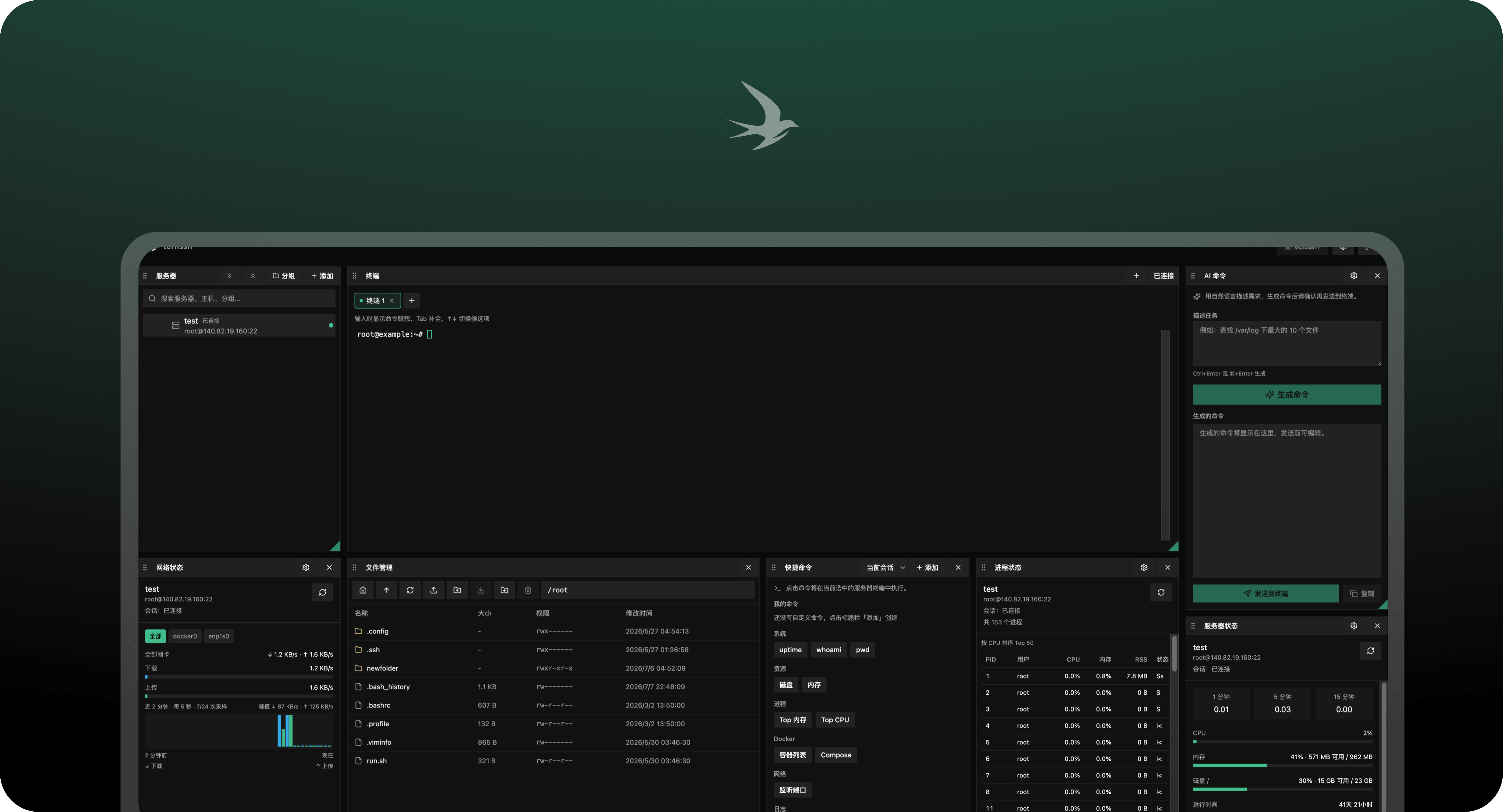
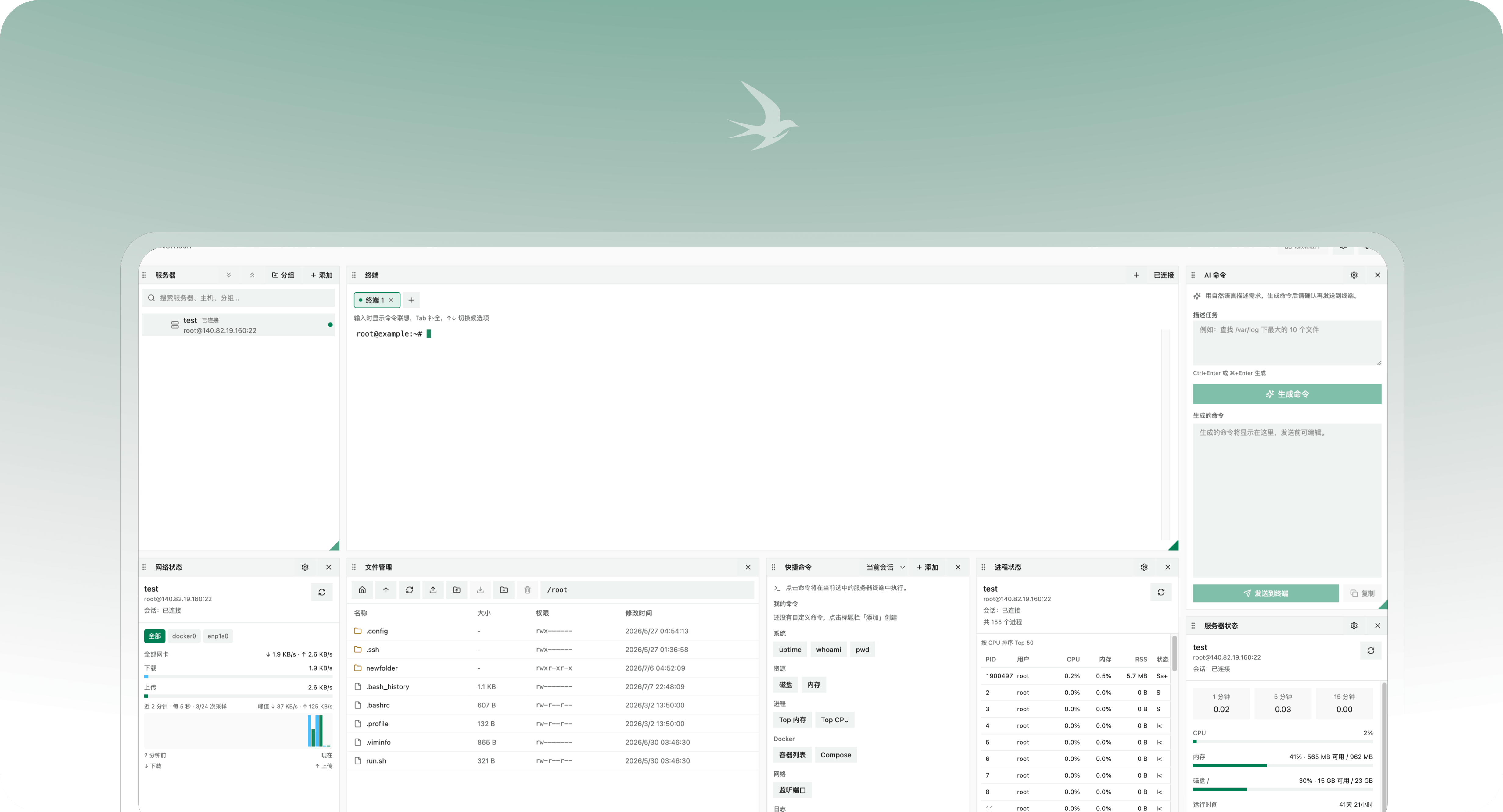
ternssh is an SSH workspace that lives in the browser, and the whole service runs on Cloudflare Workers at the edge — no jump host to maintain and no VPN to dial. The interface is a draggable dashboard: the server list, terminal, file manager and monitoring panels are widgets you place and size yourself, and the arrangement is saved and can be exported as JSON.
Under the hood it does not wrap an existing SSH library — the handshake, shell, SFTP and remote command execution are implemented in TypeScript from scratch. Each SSH session gets its own Durable Object instance holding a WebSocket connection, while servers, credentials and layouts live in D1. Besides Cloudflare Workers it also self-hosts from the official Docker image. Licensed GPL-3.0-or-later.
Draggable dashboard: Server list, terminal, file manager and monitoring widgets sit on a grid you arrange freely. Size and position persist, and the layout imports and exports as JSON so the same workspace follows you to another machine.
Web terminal: A full SSH terminal built on xterm.js, with multiple tabs against the same server, command suggestions, history completion and customizable colors.
SFTP file management: Browse remote directories, upload and download, drag files in, and edit remote files directly by double-clicking or right-clicking — the editor is CodeMirror with syntax highlighting, up to 2MB per file.
Status monitoring: CPU, memory and disk usage, network throughput charts, and a process list sorted by CPU, each as its own live widget on the dashboard.
Quick commands: Save the commands you run often and fire them with one click, either into the current terminal or broadcast to every session; presets cover uptime, disk, memory, Docker containers and more.
AI command helper: Describe the task in plain language and an OpenAI-compatible model drafts the shell command. You can edit it before it is sent to the terminal — nothing runs on your behalf.
Credential vault: Passwords and private keys are kept in a vault in D1 and can be reused when adding a new server instead of being pasted again.
Three authentication modes: With nothing configured, the first visit forces an onboarding step that sets a username and password (stored as a PBKDF2 hash) and then uses HTTP Basic Auth. On Workers you can switch to Cloudflare Access for edge JWT gating. Once auth is on, every path requires it and responses carry a noindex header.
Two deployment paths: Deploy to Cloudflare Workers in one click, or run the prebuilt Docker image (port 8787 by default); Docker Compose and building from source both work too.
Open source project: The source code is hosted on GitHub, so developers can study the implementation, contribute, or customize it for their own needs.
ternssh is an SSH workspace that lives in the browser, and the whole service runs on Cloudflare Workers at the edge — no jump host to maintain and no VPN to dial. The interface is a draggable dashboard: the server list, terminal, file manager and monitoring panels are widgets you place and size yourself, and the arrangement is saved and can be exported as JSON.
Under the hood it does not wrap an existing SSH library — the handshake, shell, SFTP and remote command execution are implemented in TypeScript from scratch. Each SSH session gets its own Durable Object instance holding a WebSocket connection, while servers, credentials and layouts live in D1. Besides Cloudflare Workers it also self-hosts from the official Docker image. Licensed GPL-3.0-or-later.
Features
Draggable dashboard: Server list, terminal, file manager and monitoring widgets sit on a grid you arrange freely. Size and position persist, and the layout imports and exports as JSON so the same workspace follows you to another machine.
Web terminal: A full SSH terminal built on xterm.js, with multiple tabs against the same server, command suggestions, history completion and customizable colors.
SFTP file management: Browse remote directories, upload and download, drag files in, and edit remote files directly by double-clicking or right-clicking — the editor is CodeMirror with syntax highlighting, up to 2MB per file.
Status monitoring: CPU, memory and disk usage, network throughput charts, and a process list sorted by CPU, each as its own live widget on the dashboard.
Quick commands: Save the commands you run often and fire them with one click, either into the current terminal or broadcast to every session; presets cover uptime, disk, memory, Docker containers and more.
AI command helper: Describe the task in plain language and an OpenAI-compatible model drafts the shell command. You can edit it before it is sent to the terminal — nothing runs on your behalf.
Credential vault: Passwords and private keys are kept in a vault in D1 and can be reused when adding a new server instead of being pasted again.
Three authentication modes: With nothing configured, the first visit forces an onboarding step that sets a username and password (stored as a PBKDF2 hash) and then uses HTTP Basic Auth. On Workers you can switch to Cloudflare Access for edge JWT gating. Once auth is on, every path requires it and responses carry a noindex header.
Two deployment paths: Deploy to Cloudflare Workers in one click, or run the prebuilt Docker image (port 8787 by default); Docker Compose and building from source both work too.
Open source project: The source code is hosted on GitHub, so developers can study the implementation, contribute, or customize it for their own needs.