Description
#Local Transcription #Interview Transcription #Speaker Identification #Whisper #faster-whisper #pyannote #Qualitative Research
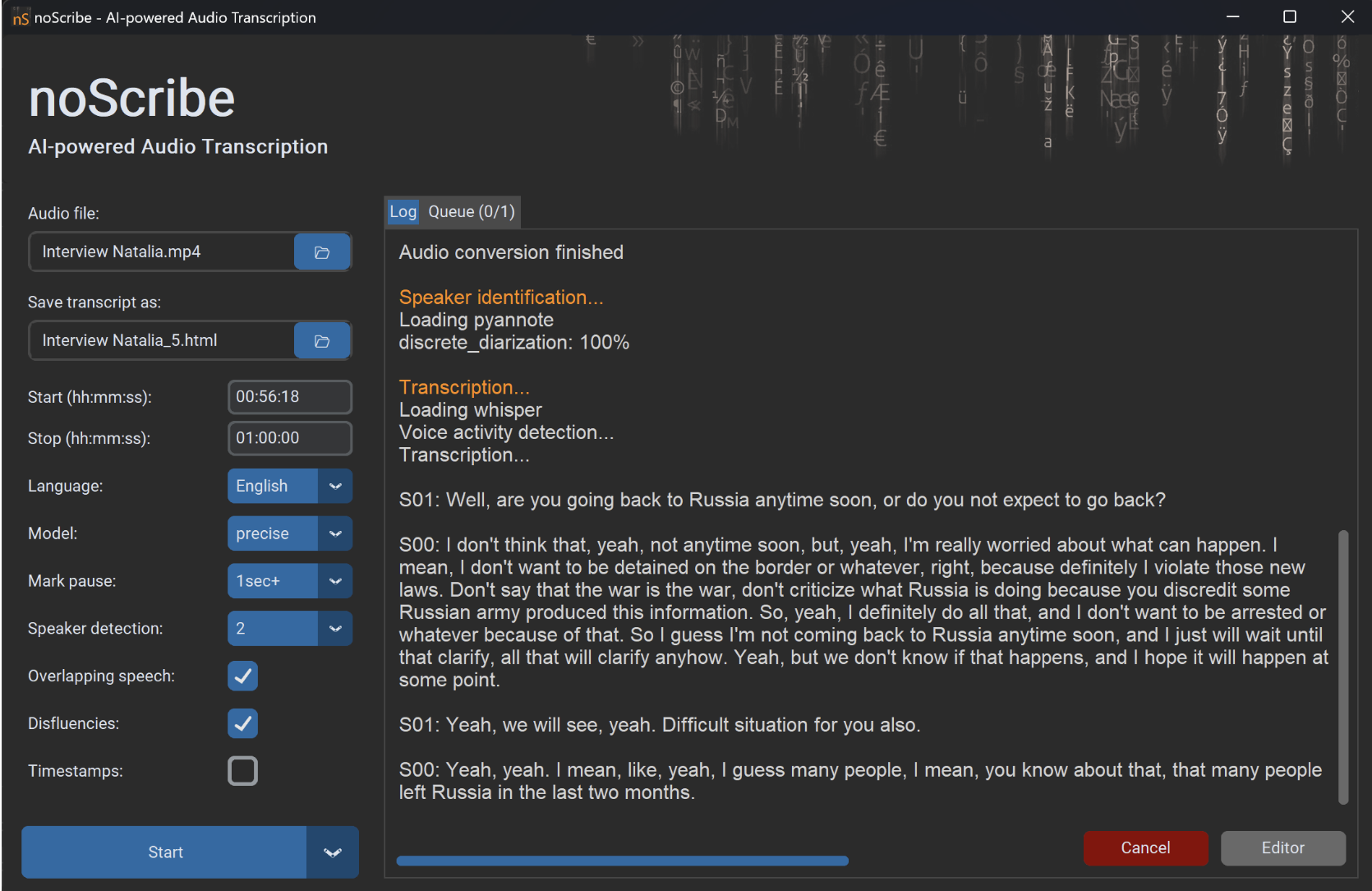
noScribe is a local AI transcription tool that is very suitable for in-depth interviews, qualitative research, oral history, and meeting recordings. It has about 2K Stars on GitHub. Its biggest feature is not just converting audio to text, but it can also distinguish speakers during transcription, organizing "who said what" together, which saves a lot of time for those who need to analyze interview content.
The entire process can be completed on your local machine. noScribe combines OpenAI Whisper, faster-whisper, and pyannote, allowing audio to be processed without uploading to third-party servers, achieving speech recognition and speaker separation. This local processing method is especially important for recordings involving respondent privacy, research ethics, internal meetings, or sensitive materials.
Local Voice Transcription: Audio files are processed directly on your own computer without needing to upload interview content to online transcription platforms, sensitive materials can remain on the local machine.
Automatic Speaker Differentiation: With the help of pyannote, it can separate speakers while recognizing speech, marking the content of different respondents or interviewers, saving the hassle of manually determining "who said this sentence" later.
Whisper Transcription: The speech recognition part combines OpenAI Whisper and faster-whisper, maintaining strong multilingual recognition capabilities while also considering local running efficiency.
Timestamps and Pause Marking: The output can include time information, and pauses during speech can also be annotated. Such details are more valuable than regular subtitle transcriptions for analyzing tone, hesitation, and dialogue rhythm in research interviews.
Multilingual Support: Based on Whisper's recognition capabilities, it can handle recordings in various languages, suitable for cross-language interviews, international research, and audio materials in different language environments.
Batch Transcription: Supports processing a batch of recordings at once, eliminating the need to operate on each file individually. This can significantly reduce repetitive work when dealing with dozens or more interview materials.
Multiple Export Formats: After transcription, results can be output in HTML, VTT, and plain text formats, making it easy to read, proofread, and import into other qualitative research, subtitle, or text analysis tools.
noScribeEdit Proofreading Editor: The project also provides an independent noScribeEdit, allowing users to listen to the original audio while modifying the automatic transcription results, which is closer to the real workflow of organizing interviews.
Designed for Research Scenarios: The author Kai Dröge has a background in sociology and computer science, so many details of the software are clearly centered around the actual needs of researchers in organizing, proofreading, and analyzing interview materials.
Supports Multiple Desktop Systems: The current version 0.7 provides builds for Windows, Apple Silicon Mac, and Linux. Intel Mac users should note that their version is currently at 0.6.
Large Installation Package: Due to the need to package local AI models, the installation file may reach several GB. If you plan to use it long-term, it's best to reserve enough disk space in advance.
Automatic Transcription Still Requires Manual Proofreading: The project itself also clearly reminds that AI transcription is not 100% accurate and may have text recognition errors, speaker misidentification, text repetition, and model hallucinations. Formal research materials, paper citations, or interview transcripts that need to be publicly released should still be manually proofread against the audio before use.
noScribe is a local AI transcription tool that is very suitable for in-depth interviews, qualitative research, oral history, and meeting recordings. It has about 2K Stars on GitHub. Its biggest feature is not just converting audio to text, but it can also distinguish speakers during transcription, organizing "who said what" together, which saves a lot of time for those who need to analyze interview content.
The entire process can be completed on your local machine. noScribe combines OpenAI Whisper, faster-whisper, and pyannote, allowing audio to be processed without uploading to third-party servers, achieving speech recognition and speaker separation. This local processing method is especially important for recordings involving respondent privacy, research ethics, internal meetings, or sensitive materials.
Software Features
Local Voice Transcription: Audio files are processed directly on your own computer without needing to upload interview content to online transcription platforms, sensitive materials can remain on the local machine.
Automatic Speaker Differentiation: With the help of pyannote, it can separate speakers while recognizing speech, marking the content of different respondents or interviewers, saving the hassle of manually determining "who said this sentence" later.
Whisper Transcription: The speech recognition part combines OpenAI Whisper and faster-whisper, maintaining strong multilingual recognition capabilities while also considering local running efficiency.
Timestamps and Pause Marking: The output can include time information, and pauses during speech can also be annotated. Such details are more valuable than regular subtitle transcriptions for analyzing tone, hesitation, and dialogue rhythm in research interviews.
Multilingual Support: Based on Whisper's recognition capabilities, it can handle recordings in various languages, suitable for cross-language interviews, international research, and audio materials in different language environments.
Batch Transcription: Supports processing a batch of recordings at once, eliminating the need to operate on each file individually. This can significantly reduce repetitive work when dealing with dozens or more interview materials.
Multiple Export Formats: After transcription, results can be output in HTML, VTT, and plain text formats, making it easy to read, proofread, and import into other qualitative research, subtitle, or text analysis tools.
noScribeEdit Proofreading Editor: The project also provides an independent noScribeEdit, allowing users to listen to the original audio while modifying the automatic transcription results, which is closer to the real workflow of organizing interviews.
Designed for Research Scenarios: The author Kai Dröge has a background in sociology and computer science, so many details of the software are clearly centered around the actual needs of researchers in organizing, proofreading, and analyzing interview materials.
Supports Multiple Desktop Systems: The current version 0.7 provides builds for Windows, Apple Silicon Mac, and Linux. Intel Mac users should note that their version is currently at 0.6.
Large Installation Package: Due to the need to package local AI models, the installation file may reach several GB. If you plan to use it long-term, it's best to reserve enough disk space in advance.
Automatic Transcription Still Requires Manual Proofreading: The project itself also clearly reminds that AI transcription is not 100% accurate and may have text recognition errors, speaker misidentification, text repetition, and model hallucinations. Formal research materials, paper citations, or interview transcripts that need to be publicly released should still be manually proofread against the audio before use.