
Description
#Disk Analysis #Space Usage Analysis #Disk Cleanup #File Management #Portable Software #Windows
SpaceSniffer is a classic disk space analysis tool that visually displays the usage of files and folders on your hard drive through an intuitive treemap. Compared to opening folders layer by layer to find large files, it allows you to quickly see what content is filling up your hard drive, making it particularly suitable for cleaning up the C drive, finding large files, and analyzing disk space. SpaceSniffer is designed to be portable, requiring no traditional installation process; it can be run immediately after extraction, which is why it is often referred to as SpaceSniffer Portable.
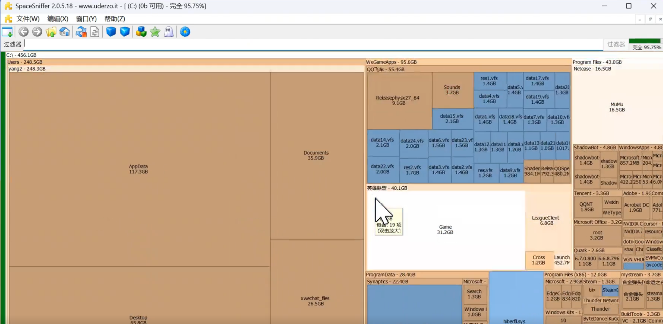
Although the software interface is relatively simple, the disk usage information is very intuitive: the larger the rectangular area, the more disk space it occupies. When your hard drive suddenly becomes full, and you don't know which files are taking up space, scanning with it usually helps you quickly find the target.
Disk Space Visualization: Uses a treemap to display disk content, with different sized areas corresponding to different files and folders, making it easy to spot large files and directories.
Quick Disk Scanning: After selecting the disk or directory to analyze, scanning can begin, dynamically displaying space usage, making it easy to locate large content quickly.
Hierarchical Viewing: You can directly enter a folder to continue viewing the internal space distribution, making it easier to find large files in complex directories.
File Filtering: Supports filtering by file name, extension, and other criteria, making it more efficient to find specific types of content among a large number of files.
Space Change Monitoring: The results are continuously updated during the scanning process, allowing users to understand the current disk and directory space distribution more intuitively.
Portable and Green: No traditional installation is required; just extract and use, so you won't need to install a large management software just to check disk space. It is also suitable for being placed on a USB drive or in a maintenance toolbox for on-the-go use.
Suitable for Disk Cleanup Assistance: The focus of SpaceSniffer is on analyzing and locating space usage. After finding large files, it is recommended to confirm the file's purpose before deciding whether to delete it, especially not to handle unknown files in the Windows system directory casually.
SpaceSniffer is a classic disk space analysis tool that visually displays the usage of files and folders on your hard drive through an intuitive treemap. Compared to opening folders layer by layer to find large files, it allows you to quickly see what content is filling up your hard drive, making it particularly suitable for cleaning up the C drive, finding large files, and analyzing disk space. SpaceSniffer is designed to be portable, requiring no traditional installation process; it can be run immediately after extraction, which is why it is often referred to as SpaceSniffer Portable.
Although the software interface is relatively simple, the disk usage information is very intuitive: the larger the rectangular area, the more disk space it occupies. When your hard drive suddenly becomes full, and you don't know which files are taking up space, scanning with it usually helps you quickly find the target.
Software Features
Disk Space Visualization: Uses a treemap to display disk content, with different sized areas corresponding to different files and folders, making it easy to spot large files and directories.
Quick Disk Scanning: After selecting the disk or directory to analyze, scanning can begin, dynamically displaying space usage, making it easy to locate large content quickly.
Hierarchical Viewing: You can directly enter a folder to continue viewing the internal space distribution, making it easier to find large files in complex directories.
File Filtering: Supports filtering by file name, extension, and other criteria, making it more efficient to find specific types of content among a large number of files.
Space Change Monitoring: The results are continuously updated during the scanning process, allowing users to understand the current disk and directory space distribution more intuitively.
Portable and Green: No traditional installation is required; just extract and use, so you won't need to install a large management software just to check disk space. It is also suitable for being placed on a USB drive or in a maintenance toolbox for on-the-go use.
Suitable for Disk Cleanup Assistance: The focus of SpaceSniffer is on analyzing and locating space usage. After finding large files, it is recommended to confirm the file's purpose before deciding whether to delete it, especially not to handle unknown files in the Windows system directory casually.
Screenshots
Tags:disk-space