Description
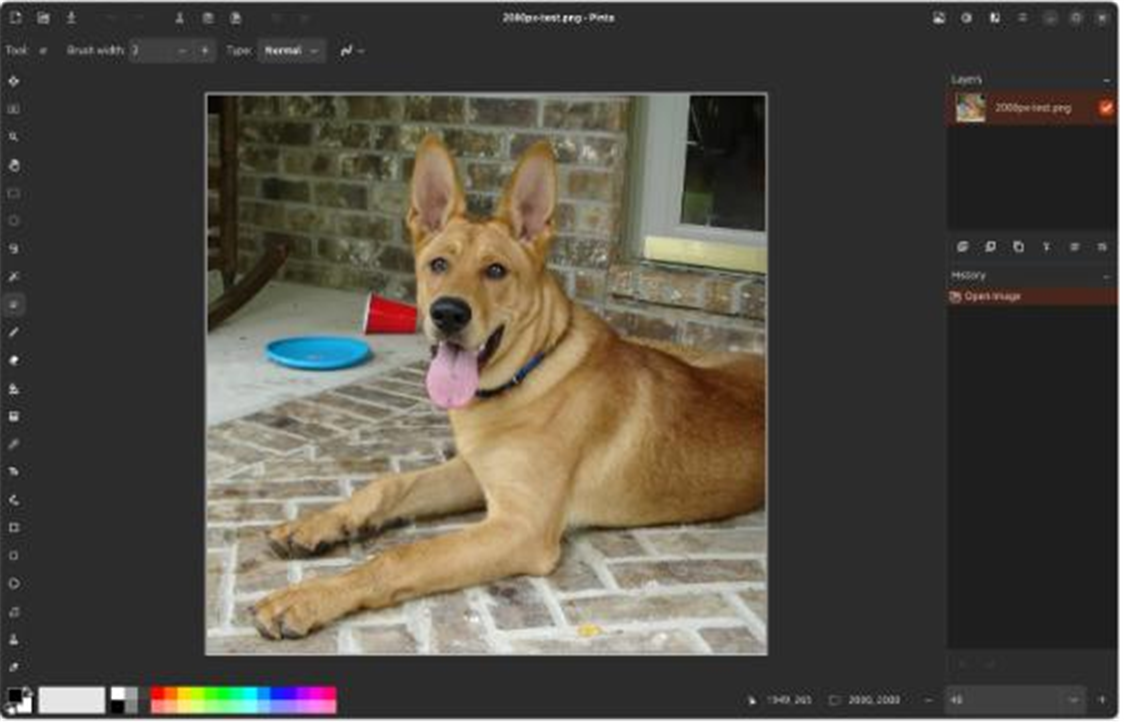
GIMP is complete but its interface puts people off, when you just want to sketch a bit or fix an image without learning a pile of concepts. Pinta is that lightweight choice — like an upgraded Paint with layers and unlimited undo, yet learnable in minutes — an open-source, cross-platform take inspired by Paint.NET.
Open-source and free, on Windows, macOS and Linux.
Simple and intuitive: a clean interface with easy-to-find brush, shape, text and fill tools that a beginner picks up in minutes.
Layer support: layers and blend modes handle simple compositing, annotation and layered edits — well beyond the system Paint.
Unlimited undo: a full history lets you experiment freely and step all the way back without fear of ruining the image.
Adjustments and effects: built-in brightness/contrast, levels, blur and sharpen cover everyday edits.
Consistent cross-platform: the same experience across the three desktop systems, light on resources and fine on older machines.
Open-source and free, on Windows, macOS and Linux.
Features
Simple and intuitive: a clean interface with easy-to-find brush, shape, text and fill tools that a beginner picks up in minutes.
Layer support: layers and blend modes handle simple compositing, annotation and layered edits — well beyond the system Paint.
Unlimited undo: a full history lets you experiment freely and step all the way back without fear of ruining the image.
Adjustments and effects: built-in brightness/contrast, levels, blur and sharpen cover everyday edits.
Consistent cross-platform: the same experience across the three desktop systems, light on resources and fine on older machines.