Description
Passwords, account details, contract notes, a diary — you never quite trust a cloud notebook with them, but scattering them across forty text files means never finding anything.
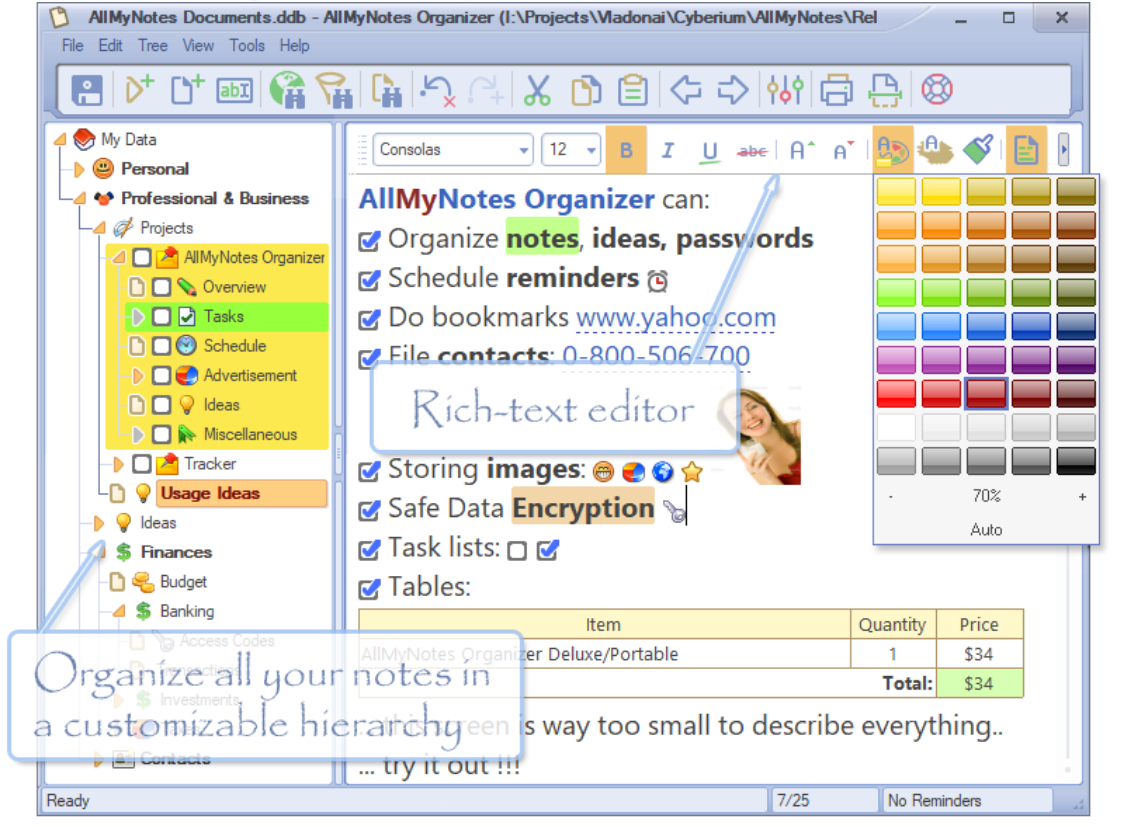
AllMyNotes Organizer keeps everything in one encrypted local file: no cloud, no account, no subscription. A drag-anywhere tree on the left, a rich-text editor on the right with tables, images, task checkboxes and links. The file format is self-healing, so a partially damaged file still gives most of its content back.
The Lite edition is free and enough for personal use; Deluxe adds more skins, reminders and backup options. The download here is the Lite installer, about 5 MB.
Tree organisation: nest folders and notes freely, drag to rearrange, keep everything in one file.
Instant search: results appear as you type across all notes, even with thousands of them.
Rich text: fonts, colours, tables, images, checkbox task lists and hyperlinks.
Password protection: the whole data file is encrypted on disk; disk scanners see nothing readable.
Thumbnail view: browse notes as thumbnails to find image-heavy ones faster.
Portable: the data is a single file — copy it to a USB stick or another PC and carry on.
AllMyNotes Organizer keeps everything in one encrypted local file: no cloud, no account, no subscription. A drag-anywhere tree on the left, a rich-text editor on the right with tables, images, task checkboxes and links. The file format is self-healing, so a partially damaged file still gives most of its content back.
The Lite edition is free and enough for personal use; Deluxe adds more skins, reminders and backup options. The download here is the Lite installer, about 5 MB.
Features
Tree organisation: nest folders and notes freely, drag to rearrange, keep everything in one file.
Instant search: results appear as you type across all notes, even with thousands of them.
Rich text: fonts, colours, tables, images, checkbox task lists and hyperlinks.
Password protection: the whole data file is encrypted on disk; disk scanners see nothing readable.
Thumbnail view: browse notes as thumbnails to find image-heavy ones faster.
Portable: the data is a single file — copy it to a USB stick or another PC and carry on.
Screenshots
Tags:notes