Description
You took a screenshot and want to box something, blur a bit, paste in another one. Photoshop is too heavy for that; the built-in Paint has no layers, so one wrong stroke means starting over.
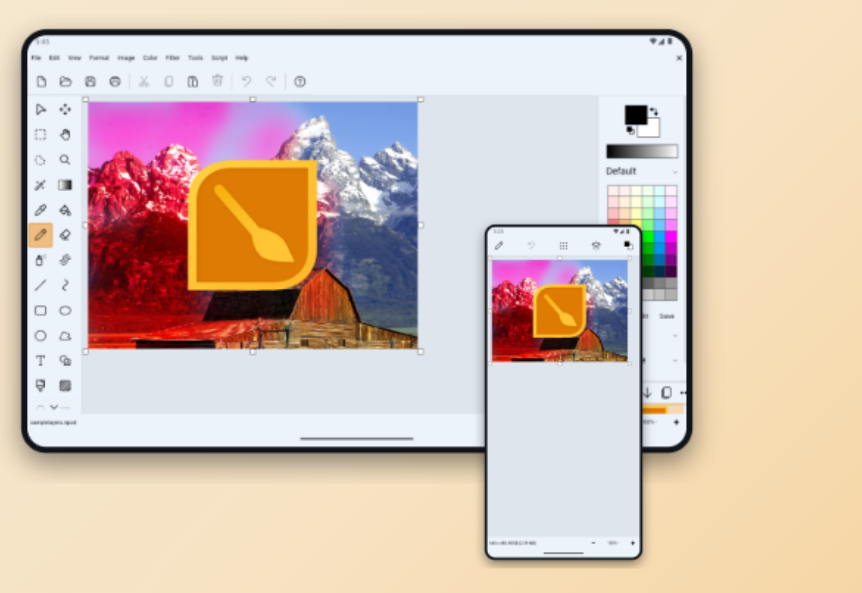
NPS Image Editor looks like classic Paint — tools on the left, palette on the right, nothing to learn — but underneath it is a layer-based editor: layers move, hide and process independently, there are 33 blending modes, and real retouching tools like magic wand, lasso, clone stamp and warp.
It is tuned for screenshots and pixel art: Ripple Delete removes whole rows or columns, a Tile tool handles sprites, and Keyed selection lifts text off a background. Free, with a portable build that runs from the unzipped folder.
Brushes and shapes: brushes of almost any shape, rectangles, ellipses and Bézier curves, gradients, and a text tool with effects.
Selection tools: rectangle, freeform lasso, magic wand, and a colour-keyed selection mode.
Layers and blending: non-destructive multi-layer editing with 33 modes including Multiply, Screen and Overlay.
Retouching: clone stamp, warp, red-eye removal, black-and-white conversion, bitwise operations.
Built-in colour picker: a standalone Color Picker for grabbing colours off the screen while doing web work.
Cross-platform: a Windows build plus a browser version you can try without installing anything.
NPS Image Editor looks like classic Paint — tools on the left, palette on the right, nothing to learn — but underneath it is a layer-based editor: layers move, hide and process independently, there are 33 blending modes, and real retouching tools like magic wand, lasso, clone stamp and warp.
It is tuned for screenshots and pixel art: Ripple Delete removes whole rows or columns, a Tile tool handles sprites, and Keyed selection lifts text off a background. Free, with a portable build that runs from the unzipped folder.
Features
Brushes and shapes: brushes of almost any shape, rectangles, ellipses and Bézier curves, gradients, and a text tool with effects.
Selection tools: rectangle, freeform lasso, magic wand, and a colour-keyed selection mode.
Layers and blending: non-destructive multi-layer editing with 33 modes including Multiply, Screen and Overlay.
Retouching: clone stamp, warp, red-eye removal, black-and-white conversion, bitwise operations.
Built-in colour picker: a standalone Color Picker for grabbing colours off the screen while doing web work.
Cross-platform: a Windows build plus a browser version you can try without installing anything.
Screenshots
Tags:image-editing