Description
Halfway through a working day the taskbar is a row of slivers: three VSCode windows, two terminals, a few Excel books, plus Edge and Chrome. Finding one means sweeping the mouse along the taskbar and reading thumbnails. Browsers solved this with tabs years ago; Windows windows are still each on their own.
WindowTabs brings the tab UI to every window. Drag two windows together and a Chrome-style tab strip appears above them — click a tab to switch, exactly like switching browser tabs. Excel and Word can live in one group; Edge, Chrome and Firefox, incognito windows included, can be handled as a single browser.
Microsoft tried this themselves — the Windows 10 experiment called Sets — and then dropped it. WindowTabs predates Sets, and never touches the OS internals: unzip and it works. Maurice Flanagan wrote it in 2009 and later open-sourced it; after several forks, this ss_ version is maintained by Satoshi Yamamoto and updated frequently.
Grouping is a drag: drag a tab onto another group to merge, drag it out to split it into its own window. Ctrl-click to multi-select tabs, Shift-click for a range, and drags and context-menu actions then apply to the whole selection.
Snapping and multi-monitor in one click: the context menu snaps a window left/right/top/bottom, at 90%, 70%, 50% or 30%, or to fill the current display or the whole desktop. On a multi-display setup you throw a window to another screen from a menu item instead of dragging it there.
Pin, rename and colour tabs: pin the windows you always keep open (pinned tabs can show icon-only or a fixed width), rename a tab, and colour it from seven colours in fill, underline or border styles — colour the VSCode, terminal and WinMerge of one project the same and the grouping is obvious at a glance.
Bulk close: close N tabs to the left, N to the right, all others, or all of them — the same habits you already have from a browser.
System actions in the menu: copy the executable’s path, copy the window title, open the containing folder, or force-kill a process that has hung.
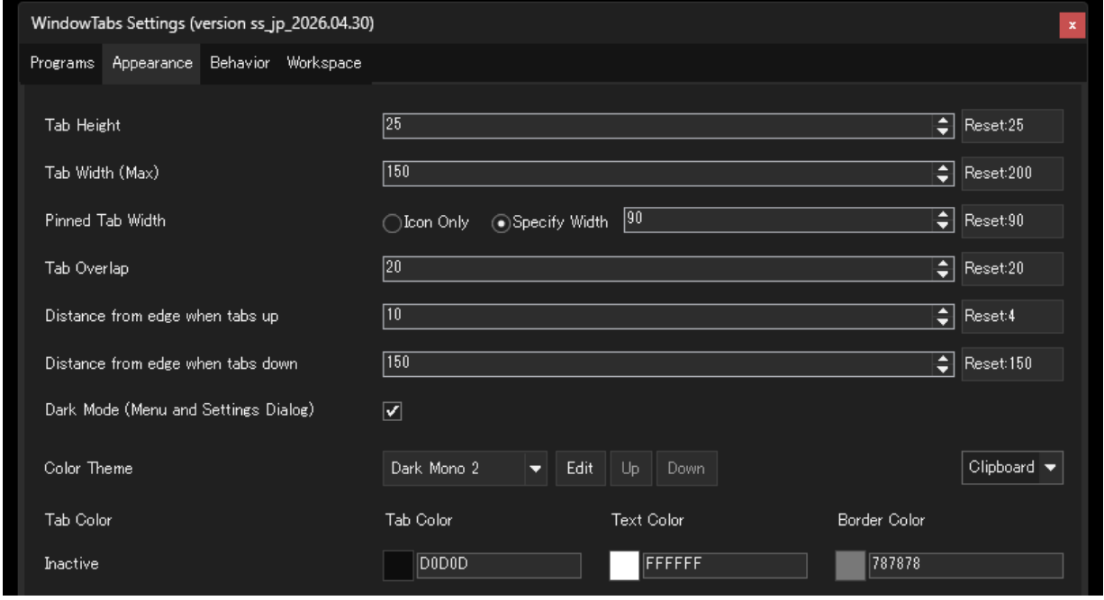
Appearance is adjustable: tab height, maximum width, overlap and distance from the window edge are all settings; the menu and settings dialog support dark mode, and colour themes can be edited and copied in and out via the clipboard.
Portable: unzip and run, carry it on a USB stick and pick up on another machine. MIT licensed, no ads, nothing held back.
WindowTabs brings the tab UI to every window. Drag two windows together and a Chrome-style tab strip appears above them — click a tab to switch, exactly like switching browser tabs. Excel and Word can live in one group; Edge, Chrome and Firefox, incognito windows included, can be handled as a single browser.
Microsoft tried this themselves — the Windows 10 experiment called Sets — and then dropped it. WindowTabs predates Sets, and never touches the OS internals: unzip and it works. Maurice Flanagan wrote it in 2009 and later open-sourced it; after several forks, this ss_ version is maintained by Satoshi Yamamoto and updated frequently.
Features
Grouping is a drag: drag a tab onto another group to merge, drag it out to split it into its own window. Ctrl-click to multi-select tabs, Shift-click for a range, and drags and context-menu actions then apply to the whole selection.
Snapping and multi-monitor in one click: the context menu snaps a window left/right/top/bottom, at 90%, 70%, 50% or 30%, or to fill the current display or the whole desktop. On a multi-display setup you throw a window to another screen from a menu item instead of dragging it there.
Pin, rename and colour tabs: pin the windows you always keep open (pinned tabs can show icon-only or a fixed width), rename a tab, and colour it from seven colours in fill, underline or border styles — colour the VSCode, terminal and WinMerge of one project the same and the grouping is obvious at a glance.
Bulk close: close N tabs to the left, N to the right, all others, or all of them — the same habits you already have from a browser.
System actions in the menu: copy the executable’s path, copy the window title, open the containing folder, or force-kill a process that has hung.
Appearance is adjustable: tab height, maximum width, overlap and distance from the window edge are all settings; the menu and settings dialog support dark mode, and colour themes can be edited and copied in and out via the clipboard.
Portable: unzip and run, carry it on a USB stick and pick up on another machine. MIT licensed, no ads, nothing held back.