Description
A photo straight off a phone is 5 MB. Put a few of those on a page and the first paint crawls. Online compressors make you upload one at a time and cap how many you can do; the command-line tools compress beautifully but you have to remember the flags every single time.
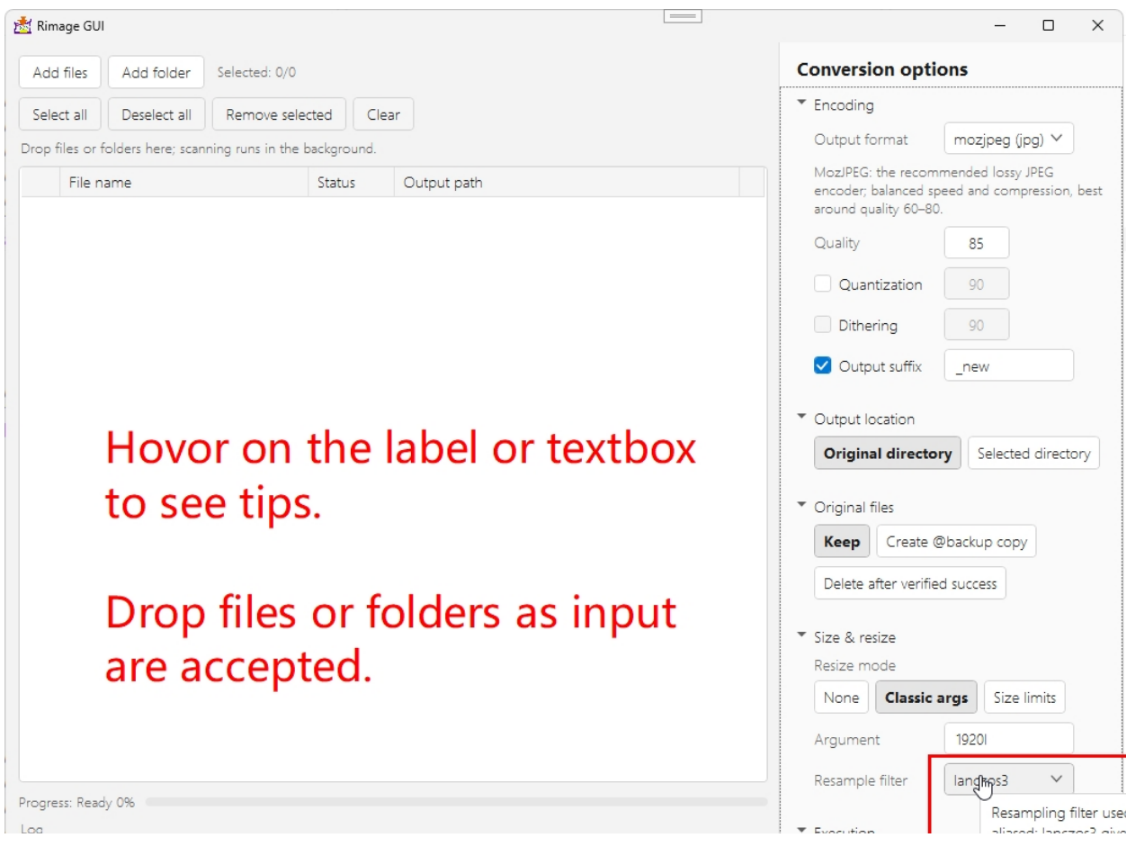
rimage_gui is a Windows front end for rimage, the Rust image-compression CLI. Drop a folder onto the window and it scans recursively in the background, drops the extensions it cannot handle, and batch-compresses the rest with whichever encoder you picked. At the default quality of 85 the difference is essentially invisible while the file size falls off a cliff; push past 90 if you want "no visible loss at all".
Seven encoders ship with it — mozjpeg, jpeg, oxipng, png, webp, avif and jpeg_xl — each labelled with the extension it produces, and the quality box disables itself for the lossless ones. WebP at quality 100 with no quantization switches to true lossless automatically. SVG is accepted as an input format too.
One window, drag and drop: file list on the left, conversion settings on the right. Throw files or whole folders anywhere on the list; scanning runs in the background so the UI never freezes.
You choose where output goes: write back to the original directory or to one you pick (optionally preserving the folder structure), add a filename suffix, keep the originals, make
Resize on the way through: classic arguments like
The log shows the actual command: live progress and per-file status, with the exact command line and failure diagnostics written to the log, and a succeeded/failed/skipped summary at the end. Runs can be cancelled midway.
Backend embedded and verified: the release build bundles the rimage binary for your architecture, unpacks it to
Follows the system: the UI tracks the Windows light/dark theme, and the Chinese/English strings follow the system language.
Format coverage: reads avif, bmp, hdr, jpg, jxl, png, psd, tif, webp and svg; writes avif, jpg, jxl, png, webp and svg.
One warning worth repeating: set the quality parameter too high and the output can end up larger than the original — the author flags this in the docs.
rimage_gui is a Windows front end for rimage, the Rust image-compression CLI. Drop a folder onto the window and it scans recursively in the background, drops the extensions it cannot handle, and batch-compresses the rest with whichever encoder you picked. At the default quality of 85 the difference is essentially invisible while the file size falls off a cliff; push past 90 if you want "no visible loss at all".
Seven encoders ship with it — mozjpeg, jpeg, oxipng, png, webp, avif and jpeg_xl — each labelled with the extension it produces, and the quality box disables itself for the lossless ones. WebP at quality 100 with no quantization switches to true lossless automatically. SVG is accepted as an input format too.
Features
One window, drag and drop: file list on the left, conversion settings on the right. Throw files or whole folders anywhere on the list; scanning runs in the background so the UI never freezes.
You choose where output goes: write back to the original directory or to one you pick (optionally preserving the folder structure), add a filename suffix, keep the originals, make
@backup copies, or delete them only after the output has been verified.Resize on the way through: classic arguments like
@1.5, 150%, 1920x1080 and 720w, or a bound on the longest/shortest edge, with rimage’s full resampling filter list.The log shows the actual command: live progress and per-file status, with the exact command line and failure diagnostics written to the log, and a succeeded/failed/skipped summary at the end. Runs can be cancelled midway.
Backend embedded and verified: the release build bundles the rimage binary for your architecture, unpacks it to
%LocalAppData% on first use, checks its SHA-256 and then its --version, and refuses to run against a version it does not target.Follows the system: the UI tracks the Windows light/dark theme, and the Chinese/English strings follow the system language.
Format coverage: reads avif, bmp, hdr, jpg, jxl, png, psd, tif, webp and svg; writes avif, jpg, jxl, png, webp and svg.
One warning worth repeating: set the quality parameter too high and the output can end up larger than the original — the author flags this in the docs.