Description
Would you still install CCleaner today? It scans, reports a pile of "registry issues", and then wants you to buy Pro to fix them, while an updater sits in the background. FluentCleaner exists because its author got tired of exactly that — so he went back to what the 2006 version did and rewrote it.
The engine is a winapp2.ini parser. That is the cleaning-rule library the CCleaner community has maintained for well over a decade — a few thousand rules covering the cache and leftover paths of most common software. The author reckons his parser beats Piriform’s original implementation on speed, and a full system scan really does finish in seconds. Because the rules come from the community, the program itself rarely needs updating.
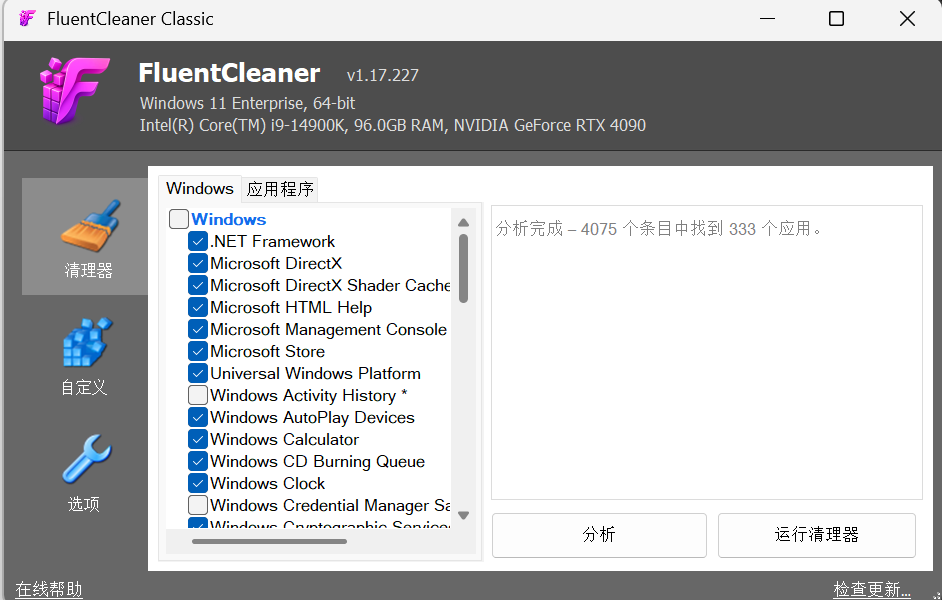
Two builds share that engine: the main one has a WinUI 3 interface, looks modern, needs the Windows App SDK runtime installed once, and unpacks to about 140 MB. Classic runs on .NET Framework 4.8 — 3.57 MB, 20 files, no runtime to install, works on practically any Windows and runs from a USB stick. The download here is the portable Classic build.
System junk: temp files, Windows Update leftovers, crash logs, thumbnail caches, DirectX shader caches — all listed as individual entries you tick, not a black-box one-click sweep.
Browser cleanup: cache, cookies and history are listed separately for Edge, Chrome and Firefox, and it tells you to close a browser that is currently holding its files open.
App and game leftovers: Steam install caches, dev-tool and media-software update residue are all covered by the winapp2 rules — usually the biggest pile on a machine that has been running for a few years.
Analyse before you clean: the Analyse button only counts. It reports how many entries it found and which applications they belong to; nothing is deleted until you press Run Cleaner.
Custom rules: drop your own Winapp2.ini fragments into the Custom folder to add cleanup entries for software the shared rule library does not cover.
Command line and silent runs: it can be driven from the command line for unattended cleanup and set to shut the machine down when it finishes, so it fits into a scheduled task.
Genuinely portable: Classic runs from the folder you unzipped it to, writes nothing to the registry, leaves no background process, and uninstalls by deleting the folder. MIT licensed, no ads, no bundles, no telemetry.
Watch where you download it: the author posts a warning in the repo that
The engine is a winapp2.ini parser. That is the cleaning-rule library the CCleaner community has maintained for well over a decade — a few thousand rules covering the cache and leftover paths of most common software. The author reckons his parser beats Piriform’s original implementation on speed, and a full system scan really does finish in seconds. Because the rules come from the community, the program itself rarely needs updating.
Two builds share that engine: the main one has a WinUI 3 interface, looks modern, needs the Windows App SDK runtime installed once, and unpacks to about 140 MB. Classic runs on .NET Framework 4.8 — 3.57 MB, 20 files, no runtime to install, works on practically any Windows and runs from a USB stick. The download here is the portable Classic build.
Features
System junk: temp files, Windows Update leftovers, crash logs, thumbnail caches, DirectX shader caches — all listed as individual entries you tick, not a black-box one-click sweep.
Browser cleanup: cache, cookies and history are listed separately for Edge, Chrome and Firefox, and it tells you to close a browser that is currently holding its files open.
App and game leftovers: Steam install caches, dev-tool and media-software update residue are all covered by the winapp2 rules — usually the biggest pile on a machine that has been running for a few years.
Analyse before you clean: the Analyse button only counts. It reports how many entries it found and which applications they belong to; nothing is deleted until you press Run Cleaner.
Custom rules: drop your own Winapp2.ini fragments into the Custom folder to add cleanup entries for software the shared rule library does not cover.
Command line and silent runs: it can be driven from the command line for unattended cleanup and set to shut the machine down when it finishes, so it fits into a scheduled task.
Genuinely portable: Classic runs from the folder you unzipped it to, writes nothing to the registry, leaves no background process, and uninstalls by deleting the folder. MIT licensed, no ads, no bundles, no telemetry.
Watch where you download it: the author posts a warning in the repo that
fluentcleaner.org has nothing to do with him — the GitHub repository is the only official source.