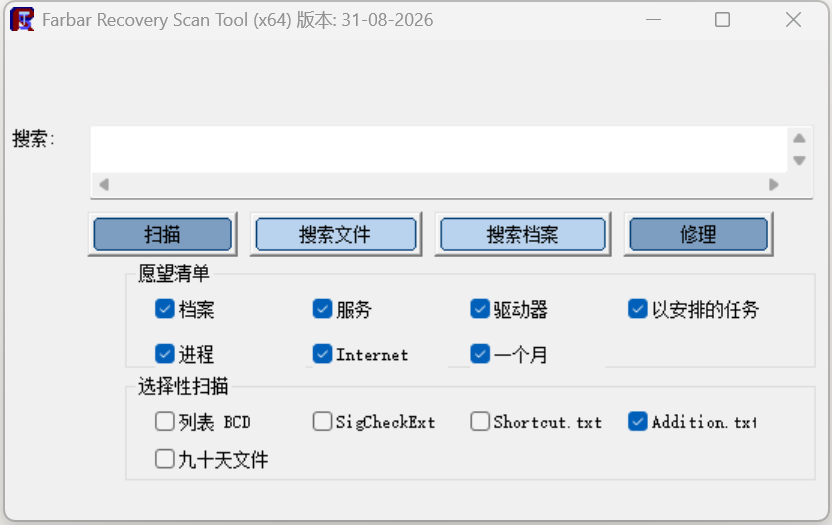
Description
FRST is a system inspection tool that ships as a single executable you just double-click. What it does is sweep the important state of a Windows install — startup entries, services, scheduled tasks, drivers, browser settings, files sitting in the usual suspect locations — and write it all out as a text report.
It makes no judgement about what is good or bad and deletes nothing on its own; the output is a listing meant to be read by a person. Computer-help forums have used it for years as their standard evidence-gathering tool: someone with a problem runs it and posts the log, someone experienced reads it and produces a list of things to remove, and FRST then carries out that list. If you can read the log yourself, it is also a direct way to investigate a slow boot, unexplained popups or a hijacked browser homepage.
Full scan: One pass enumerates startup items, services, drivers, scheduled tasks, browser extensions and the common hiding places, producing the main FRST.txt report.
Supplementary report: Ticking Addition.txt exports installed programs, accounts and restore points as well, filling in the background for an investigation.
Fix from a list: Put the entries to act on in a fixlist.txt next to the executable and it carries out the removals or restorations, leaving a record of what it did.
File and registry search: Search the whole system by file name or registry value to establish where a suspicious file actually lives and what references it.
Runs in the recovery environment: When Windows will not boot, it scans and fixes from the Windows Recovery Environment, so the system does not have to be revived first.
Single portable file: The entire tool is one executable that runs from a USB stick on any machine without installing anything.
It makes no judgement about what is good or bad and deletes nothing on its own; the output is a listing meant to be read by a person. Computer-help forums have used it for years as their standard evidence-gathering tool: someone with a problem runs it and posts the log, someone experienced reads it and produces a list of things to remove, and FRST then carries out that list. If you can read the log yourself, it is also a direct way to investigate a slow boot, unexplained popups or a hijacked browser homepage.
Features
Full scan: One pass enumerates startup items, services, drivers, scheduled tasks, browser extensions and the common hiding places, producing the main FRST.txt report.
Supplementary report: Ticking Addition.txt exports installed programs, accounts and restore points as well, filling in the background for an investigation.
Fix from a list: Put the entries to act on in a fixlist.txt next to the executable and it carries out the removals or restorations, leaving a record of what it did.
File and registry search: Search the whole system by file name or registry value to establish where a suspicious file actually lives and what references it.
Runs in the recovery environment: When Windows will not boot, it scans and fixes from the Windows Recovery Environment, so the system does not have to be revived first.
Single portable file: The entire tool is one executable that runs from a USB stick on any machine without installing anything.