
Description
Shotcut is a free and open-source video editor available for Windows, macOS and Linux. Footage goes straight onto the timeline — there is no transcoding step and no proxy files to build first — so material from a phone, a camera or a screen recorder generally just works regardless of format.
There is a lot packed in: multiple tracks, keyframes, filters, colour scopes and hardware encoding are all there, yet cutting a short piece together does not require learning any of that first. If you want an editor that costs nothing, adds no watermark and does not push you to create an account, it is one of the obvious choices.
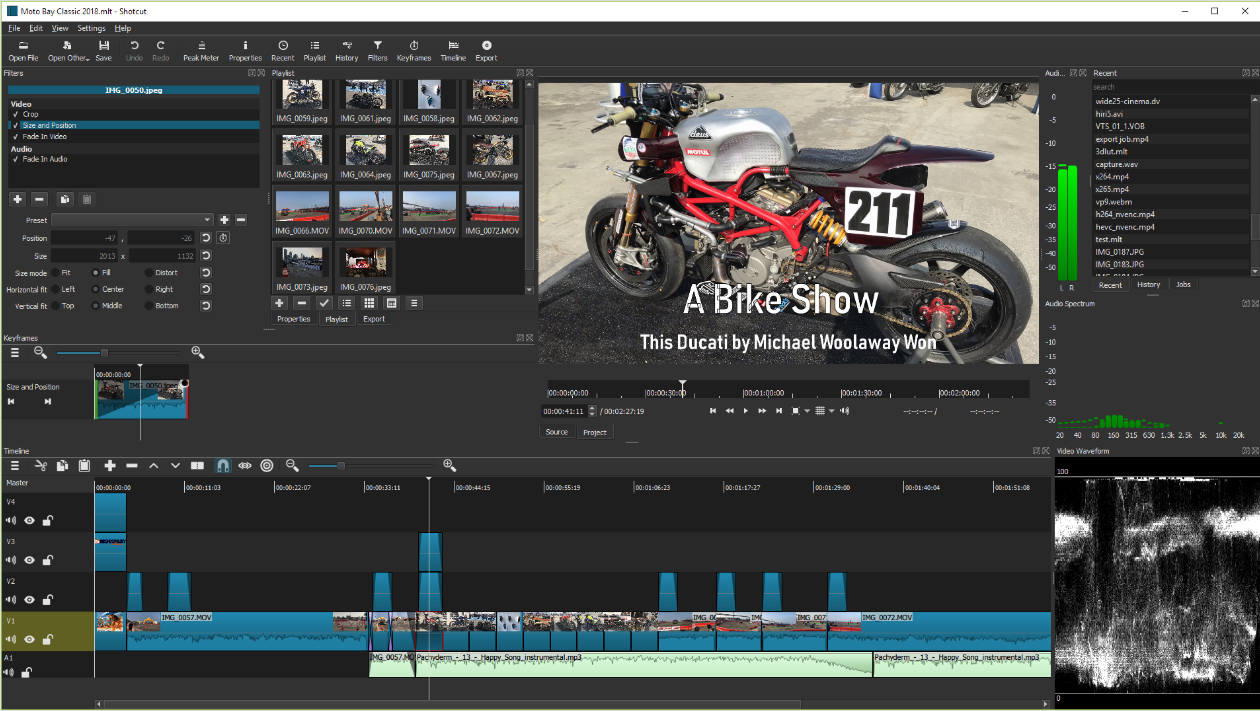
Multi-track timeline: Stack as many video and audio tracks as a project needs, with per-track lock, mute and hide, which leaves room for picture-in-picture work and layered soundtracks.
Broad format support: Decoding runs on FFmpeg, so common and obscure containers and codecs alike load, and export offers presets for most delivery targets.
Filters and keyframes: Cropping, speed changes, colour work, titles and transitions all attach to clips as filters, and their parameters can be keyframed to change over time.
Scopes and meters: Built-in waveform, histogram, vectorscope and audio level meters give you something objective to grade and set loudness against rather than judging by eye.
Capture: Record the screen, a webcam or an audio input from inside the application, and the recording lands on the timeline right away.
Hardware-accelerated export: Export can hand encoding to the GPU, which takes a noticeable bite out of the wait on longer projects.
There is a lot packed in: multiple tracks, keyframes, filters, colour scopes and hardware encoding are all there, yet cutting a short piece together does not require learning any of that first. If you want an editor that costs nothing, adds no watermark and does not push you to create an account, it is one of the obvious choices.
Features
Multi-track timeline: Stack as many video and audio tracks as a project needs, with per-track lock, mute and hide, which leaves room for picture-in-picture work and layered soundtracks.
Broad format support: Decoding runs on FFmpeg, so common and obscure containers and codecs alike load, and export offers presets for most delivery targets.
Filters and keyframes: Cropping, speed changes, colour work, titles and transitions all attach to clips as filters, and their parameters can be keyframed to change over time.
Scopes and meters: Built-in waveform, histogram, vectorscope and audio level meters give you something objective to grade and set loudness against rather than judging by eye.
Capture: Record the screen, a webcam or an audio input from inside the application, and the recording lands on the timeline right away.
Hardware-accelerated export: Export can hand encoding to the GPU, which takes a noticeable bite out of the wait on longer projects.
Screenshots
Tags:Video Editing