Description
< #Debloat #Windows 11 #Remove Bloatware #Disable AI Components #Portable #Utility
Windows 11 ships fuller than its predecessor: beyond the preinstalled UWP apps there are Copilot and Recall enabled by default, plus recommendation content on the lock screen and Start menu. Windows 11 Debloater collects all of it into one checkable list instead of a tour through Settings, the registry and group policy.
It is a graphical shell over PowerShell debloat scripts, built on Chris Titus Tech's work and farag2's Sophia Script, so the changes are auditable. The program is portable and runs from its folder, and crucially every change is backed up for rollback if something misbehaves afterwards.
Clear preinstalled apps: built-in UWP applications are listed for selective removal, thinning out what a fresh install brings along.
Disable AI components: Copilot, Recall and related built-in AI features can be turned off along with their auto-starting services, cutting background overhead.
Privacy and ads: telemetry, targeted advertising and usage tracking can be switched off, and recommendation prompts on the lock screen and system UI suppressed.
Services and tasks: background services and scheduled tasks are manageable so non-essential components stop launching themselves.
Import and export configs: save a custom debloat profile and reuse the same settings across machines instead of ticking everything again.
Full rollback: a restore path is provided, so changes can be undone and the system returned to its pre-optimization state.
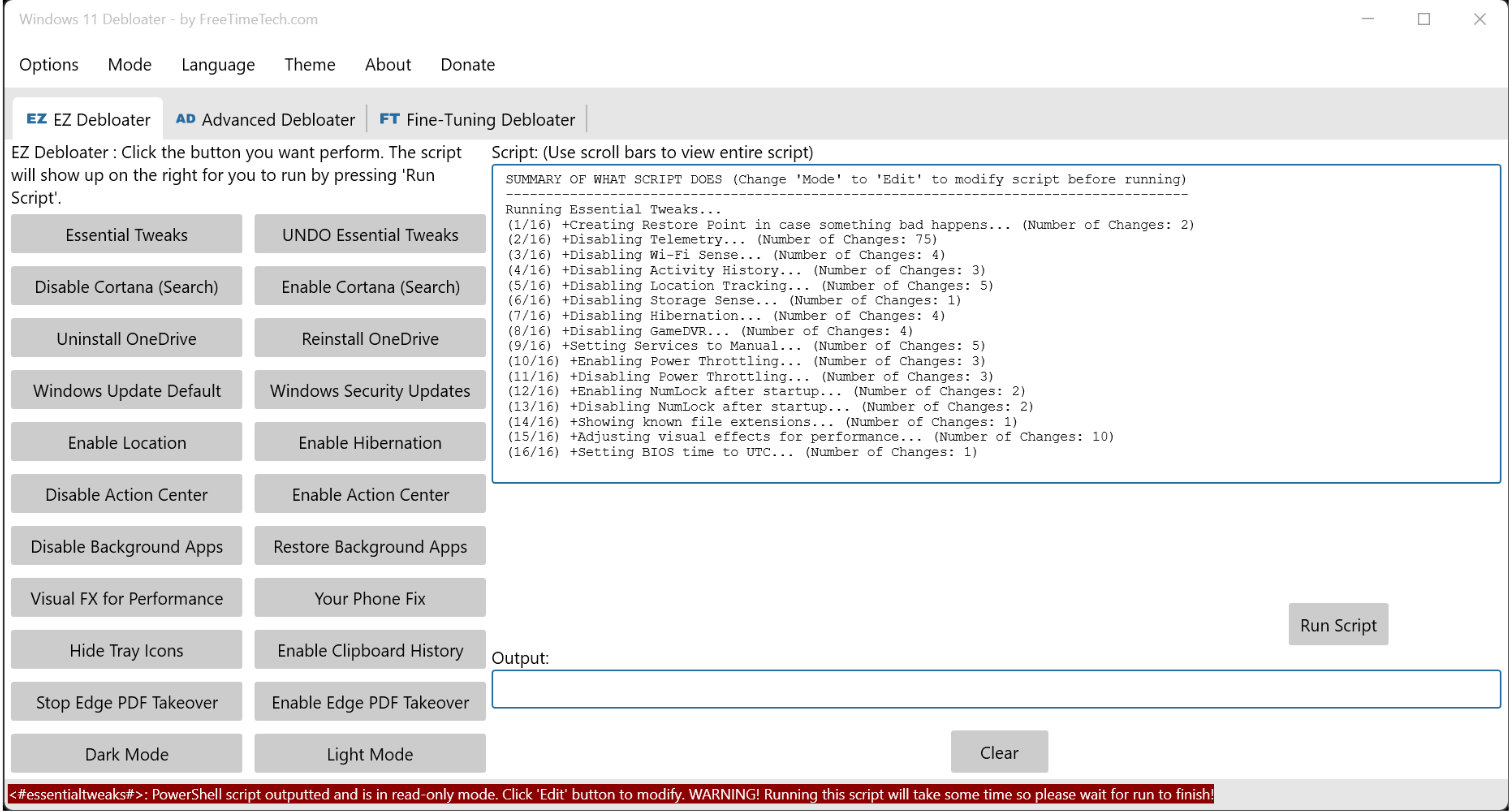
Transparent scripts: the PowerShell to be executed is displayed first, showing exactly what each step does, and it can be edited before running.
Three modes: EZ Debloater for common one-click items, Advanced Debloater with desktop, laptop, minimal and virtual machine presets, and Fine-Tuning for individual control.
Portable: unzip and run, nothing installed, no bundled third-party software, and deleting the folder removes it.
Windows 11 ships fuller than its predecessor: beyond the preinstalled UWP apps there are Copilot and Recall enabled by default, plus recommendation content on the lock screen and Start menu. Windows 11 Debloater collects all of it into one checkable list instead of a tour through Settings, the registry and group policy.
It is a graphical shell over PowerShell debloat scripts, built on Chris Titus Tech's work and farag2's Sophia Script, so the changes are auditable. The program is portable and runs from its folder, and crucially every change is backed up for rollback if something misbehaves afterwards.
Features
Clear preinstalled apps: built-in UWP applications are listed for selective removal, thinning out what a fresh install brings along.
Disable AI components: Copilot, Recall and related built-in AI features can be turned off along with their auto-starting services, cutting background overhead.
Privacy and ads: telemetry, targeted advertising and usage tracking can be switched off, and recommendation prompts on the lock screen and system UI suppressed.
Services and tasks: background services and scheduled tasks are manageable so non-essential components stop launching themselves.
Import and export configs: save a custom debloat profile and reuse the same settings across machines instead of ticking everything again.
Full rollback: a restore path is provided, so changes can be undone and the system returned to its pre-optimization state.
Transparent scripts: the PowerShell to be executed is displayed first, showing exactly what each step does, and it can be edited before running.
Three modes: EZ Debloater for common one-click items, Advanced Debloater with desktop, laptop, minimal and virtual machine presets, and Fine-Tuning for individual control.
Portable: unzip and run, nothing installed, no bundled third-party software, and deleting the folder removes it.