Description
< #Debloat #Windows 10 #Remove Bloatware #Privacy Settings #Portable #Utility
A fresh Windows 10 install carries plenty you never asked for: Xbox components, assorted UWP preinstalled apps, background services running from boot, and telemetry on by default. Windows 10 Debloater gathers everything worth removing or switching off into one window, so a few checkboxes replace an afternoon in the registry and group policy editor.
It is essentially a graphical shell over well-known PowerShell debloat scripts — Chris Titus Tech's scripts and farag2's Sophia Script — which means the changes it makes arepublic and auditable. The program is portable, runs from its folder, and every item is opt-in.
Remove preinstalled apps: it lists built-in UWP applications, including ad-supported apps and Xbox components, and removes the ones you tick.
Turn off extras: Cortana, OneDrive and similar resident components can be disabled to cut background load and sharpen everyday responsiveness.
Privacy settings: telemetry, activity tracking and recommendation prompts are collected in one place so the defaults can be switched off.
Services and scheduled tasks: startup entries, background services and scheduled tasks can be managed so idle components stop holding resources.
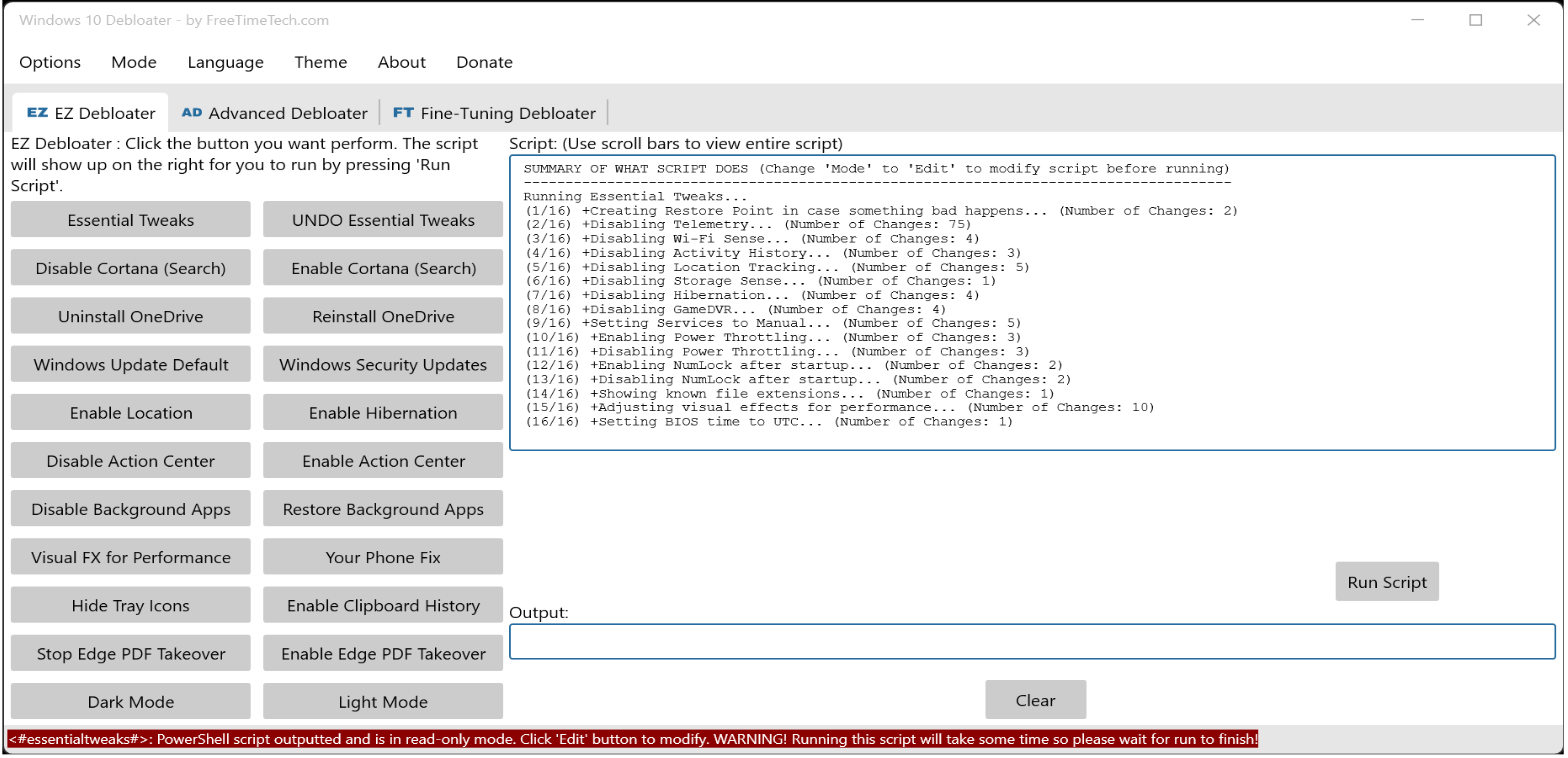
Three working modes: EZ Debloater for one-click common options, Advanced Debloater for presets (desktop, laptop, minimal, virtual machine), and Fine-Tuning for item-by-item control.
The script is visible: the PowerShell about to run is shown in the panel beside the buttons, so you can read exactly what will change — and edit it first if you want.
Multilingual interface: localization files ship with the tool and the interface language is switchable from the menu.
Portable: unzip and run, nothing is installed, and deleting the folder removes it — convenient on a USB stick for setting up several machines.
Reversible: most removed preinstalled apps can be reinstalled later from the Store, so nothing is permanently lost.
A fresh Windows 10 install carries plenty you never asked for: Xbox components, assorted UWP preinstalled apps, background services running from boot, and telemetry on by default. Windows 10 Debloater gathers everything worth removing or switching off into one window, so a few checkboxes replace an afternoon in the registry and group policy editor.
It is essentially a graphical shell over well-known PowerShell debloat scripts — Chris Titus Tech's scripts and farag2's Sophia Script — which means the changes it makes arepublic and auditable. The program is portable, runs from its folder, and every item is opt-in.
Features
Remove preinstalled apps: it lists built-in UWP applications, including ad-supported apps and Xbox components, and removes the ones you tick.
Turn off extras: Cortana, OneDrive and similar resident components can be disabled to cut background load and sharpen everyday responsiveness.
Privacy settings: telemetry, activity tracking and recommendation prompts are collected in one place so the defaults can be switched off.
Services and scheduled tasks: startup entries, background services and scheduled tasks can be managed so idle components stop holding resources.
Three working modes: EZ Debloater for one-click common options, Advanced Debloater for presets (desktop, laptop, minimal, virtual machine), and Fine-Tuning for item-by-item control.
The script is visible: the PowerShell about to run is shown in the panel beside the buttons, so you can read exactly what will change — and edit it first if you want.
Multilingual interface: localization files ship with the tool and the interface language is switchable from the menu.
Portable: unzip and run, nothing is installed, and deleting the folder removes it — convenient on a USB stick for setting up several machines.
Reversible: most removed preinstalled apps can be reinstalled later from the Store, so nothing is permanently lost.