Description
# Local Transcription # AI Notes # Speech Recognition # Audio and Video to Text # Markdown Notes
AudioNotes is a locally running, privacy-first audio and video transcription and AI note-taking tool, which has gained approximately 2.2K Stars on GitHub. Whether you listen to two hours of podcasts, online courses, or organize company meeting recordings, you no longer need to pause and manually take notes; just drop the audio or video in, and it will automatically generate a transcript and organize it into Markdown notes.
One of its appealing features is that the entire process can run on your own computer. Speech recognition uses FunASR, and the language model is called via Ollama, with the default combination being FunAudioLLM/Fun-ASR-Nano-2512 + qwen3.5:2b. Audio and video, transcribed text, notes, and conversation history are all saved locally by default, and the web service only listens to local addresses, making it more secure for handling sensitive content like meetings and personal recordings.
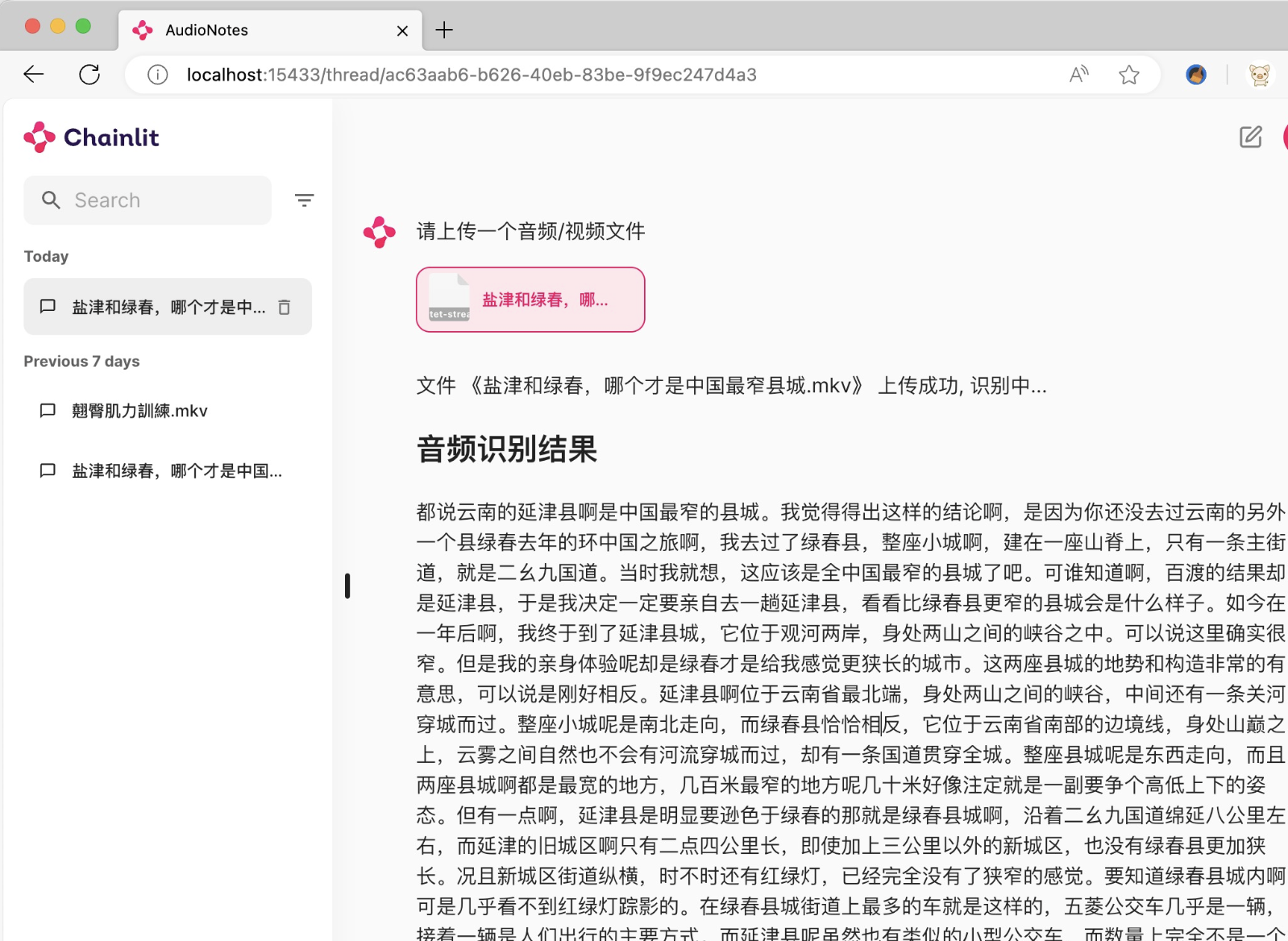
Automatic Audio and Video Transcription: After uploading recordings, podcasts, course videos, etc., it can automatically generate a complete transcript without the need to pause, rewind, and take notes manually.
AI Automatic Note Organization: After transcription is complete, you can continue to extract content through the local large model, automatically organizing it into Markdown notes, which is especially convenient for long podcasts and courses.
Direct Questions on Content: The process doesn't end with transcription; you can continue to interact with the AI regarding the imported content, making it easier to review key points or find specific information, and conversation history will also be saved.
Direct Recording via Browser: In addition to uploading existing audio and video files, it also supports recording content directly through the browser, allowing you to continue with transcription and organization right after recording.
Domain-Specific Keywords: When encountering internal company terms, industry jargon, names, etc., you can use domain-specific keywords to improve the recognition of professional vocabulary, which is particularly useful for meetings and professional courses.
Fully Local AI: Speech recognition is based on FunASR, and the large language model runs via Ollama, using FunAudioLLM/Fun-ASR-Nano-2512 + qwen3.5:2b by default, eliminating the need to submit your recordings to online transcription services.
Privacy Data Remains Local: Audio and video, transcripts, Markdown notes, and chat history are all saved locally by default, and the web service only listens to local addresses. This is particularly important for company meetings, work materials, and personal recordings.
Docker / Python Deployment: The project provides two deployment methods: Docker and Python 3.12 source code, with the default server port being 15433. The initial username and password for the Docker version are both admin, and it is recommended to change them immediately after deployment.
First Run Instructions: Although daily processing can be done entirely locally, the first installation still requires an internet connection to download the relevant images and models, with the speech model being approximately 2.15GB. It is advisable to prepare sufficient disk space in advance.
AudioNotes is a locally running, privacy-first audio and video transcription and AI note-taking tool, which has gained approximately 2.2K Stars on GitHub. Whether you listen to two hours of podcasts, online courses, or organize company meeting recordings, you no longer need to pause and manually take notes; just drop the audio or video in, and it will automatically generate a transcript and organize it into Markdown notes.
One of its appealing features is that the entire process can run on your own computer. Speech recognition uses FunASR, and the language model is called via Ollama, with the default combination being FunAudioLLM/Fun-ASR-Nano-2512 + qwen3.5:2b. Audio and video, transcribed text, notes, and conversation history are all saved locally by default, and the web service only listens to local addresses, making it more secure for handling sensitive content like meetings and personal recordings.
Software Features
Automatic Audio and Video Transcription: After uploading recordings, podcasts, course videos, etc., it can automatically generate a complete transcript without the need to pause, rewind, and take notes manually.
AI Automatic Note Organization: After transcription is complete, you can continue to extract content through the local large model, automatically organizing it into Markdown notes, which is especially convenient for long podcasts and courses.
Direct Questions on Content: The process doesn't end with transcription; you can continue to interact with the AI regarding the imported content, making it easier to review key points or find specific information, and conversation history will also be saved.
Direct Recording via Browser: In addition to uploading existing audio and video files, it also supports recording content directly through the browser, allowing you to continue with transcription and organization right after recording.
Domain-Specific Keywords: When encountering internal company terms, industry jargon, names, etc., you can use domain-specific keywords to improve the recognition of professional vocabulary, which is particularly useful for meetings and professional courses.
Fully Local AI: Speech recognition is based on FunASR, and the large language model runs via Ollama, using FunAudioLLM/Fun-ASR-Nano-2512 + qwen3.5:2b by default, eliminating the need to submit your recordings to online transcription services.
Privacy Data Remains Local: Audio and video, transcripts, Markdown notes, and chat history are all saved locally by default, and the web service only listens to local addresses. This is particularly important for company meetings, work materials, and personal recordings.
Docker / Python Deployment: The project provides two deployment methods: Docker and Python 3.12 source code, with the default server port being 15433. The initial username and password for the Docker version are both admin, and it is recommended to change them immediately after deployment.
First Run Instructions: Although daily processing can be done entirely locally, the first installation still requires an internet connection to download the relevant images and models, with the speech model being approximately 2.15GB. It is advisable to prepare sufficient disk space in advance.