Description
Some processes just will not die. You hit "End task" in the built-in Task Manager, nothing happens, you hit it again, still nothing, and eventually you reboot — closing everything else you had open because of one wedged program.
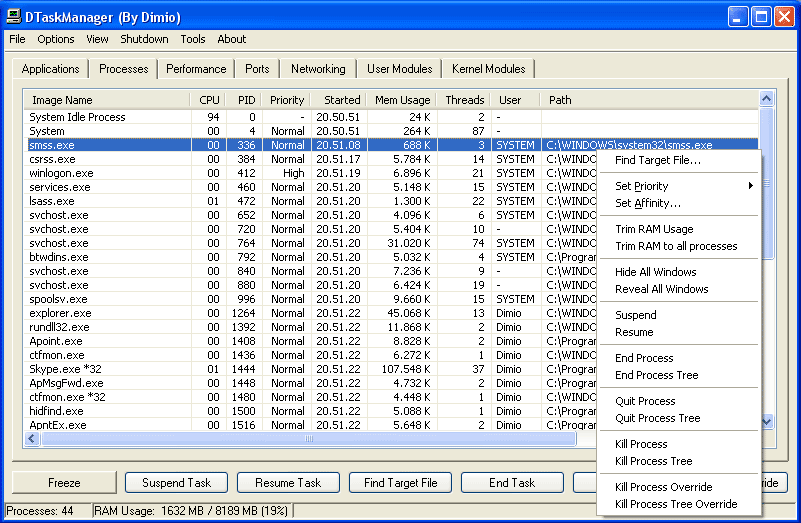
DTaskManager is a 500 KB portable tool built for exactly that. It offers three escalating ways to terminate something, the last of which goes through the kernel interface directly and clears out what the standard Task Manager cannot. It also covers a few things Windows leaves out: suspending a process, killing a single thread inside one, and showing which ports each process holds.
Three levels of termination: Normal, forced and kernel-level, applied in escalating order, so an unresponsive process no longer means a reboot.
Freeze and resume: Suspend a running program and let it continue later instead of closing it — useful when a scan or a big build is fighting for CPU.
Thread-level control: End one thread inside a process rather than the whole thing, which is far more precise when hunting a runaway loop.
Ports in plain sight: The Ports tab lists which process holds port 80 or 3306, so there is no need to drop into netstat.
Single portable file: The archive contains one executable — keep it on a USB stick and copy it wherever you need it.
DTaskManager is a 500 KB portable tool built for exactly that. It offers three escalating ways to terminate something, the last of which goes through the kernel interface directly and clears out what the standard Task Manager cannot. It also covers a few things Windows leaves out: suspending a process, killing a single thread inside one, and showing which ports each process holds.
Features
Three levels of termination: Normal, forced and kernel-level, applied in escalating order, so an unresponsive process no longer means a reboot.
Freeze and resume: Suspend a running program and let it continue later instead of closing it — useful when a scan or a big build is fighting for CPU.
Thread-level control: End one thread inside a process rather than the whole thing, which is far more precise when hunting a runaway loop.
Ports in plain sight: The Ports tab lists which process holds port 80 or 3306, so there is no need to drop into netstat.
Single portable file: The archive contains one executable — keep it on a USB stick and copy it wherever you need it.