Description
Some of the video files on your drive refuse to produce a thumbnail in Explorer, leaving a folder full of grey icons. Others play fine on the desktop but get rejected by the TV box as an unsupported format. The usual fix is transcoding — an hour or two of CPU time per film, and a visible drop in quality — even though the video stream itself was never the problem. Only the container around it was.
MetaFox does exactly one thing about that. Drop a file on its window and it changes the container without re-encoding, copying the video, audio and subtitle streams across as they are and wrapping them in MKV. A feature film takes seconds, and the picture and sound are bit-for-bit what they were, because nothing touched them. The thumbnail appears, and the box plays it.
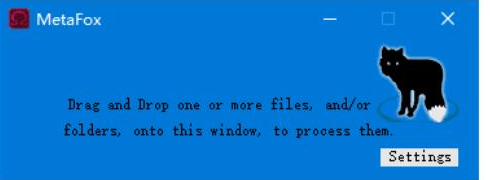
The entire interface is a blue window that says to drag files or folders onto it, with a single Settings button. It comes from Shark007, known for the Windows codec packs, and it is free, with no ads or bundled extras. 64-bit Windows only.
Drag and drop is the whole workflow: one file, dozens of files, or an entire folder can go straight onto the window, and it walks the directory processing each media file it finds. There is no task list to build and no parameters to set first.
Stream copy, not re-encode: it runs a pure remux, moving the existing video, audio and subtitle streams into the new container untouched. Speed is bound by disk throughput rather than the CPU, and quality loss is zero — which is a different thing from a converter, where no amount of parameter tuning avoids a second compression pass.
Reads the formats you actually have: HEVC, MP4, MOV, AVI, FLV, MPG, RMVB and other common containers, with the internal streams detected automatically. Multiple audio tracks and embedded subtitles survive intact, so the second language track does not quietly disappear.
Choose which tracks to keep: the settings panel takes your own rules for audio and subtitle retention, dropping the attached streams you have no use for. The resulting MKV carries fewer tracks and less container overhead.
Fixes Explorer thumbnails: video in certain encodings never generates a preview in Windows; once it is wrapped in MKV, both the shell preview and player compatibility improve. That alone makes it worth running across a local film library.
Log after every batch: processing ends with a log showing what succeeded and what did not, so a problem source file can be found directly instead of opened one by one.
MetaFox does exactly one thing about that. Drop a file on its window and it changes the container without re-encoding, copying the video, audio and subtitle streams across as they are and wrapping them in MKV. A feature film takes seconds, and the picture and sound are bit-for-bit what they were, because nothing touched them. The thumbnail appears, and the box plays it.
The entire interface is a blue window that says to drag files or folders onto it, with a single Settings button. It comes from Shark007, known for the Windows codec packs, and it is free, with no ads or bundled extras. 64-bit Windows only.
Features
Drag and drop is the whole workflow: one file, dozens of files, or an entire folder can go straight onto the window, and it walks the directory processing each media file it finds. There is no task list to build and no parameters to set first.
Stream copy, not re-encode: it runs a pure remux, moving the existing video, audio and subtitle streams into the new container untouched. Speed is bound by disk throughput rather than the CPU, and quality loss is zero — which is a different thing from a converter, where no amount of parameter tuning avoids a second compression pass.
Reads the formats you actually have: HEVC, MP4, MOV, AVI, FLV, MPG, RMVB and other common containers, with the internal streams detected automatically. Multiple audio tracks and embedded subtitles survive intact, so the second language track does not quietly disappear.
Choose which tracks to keep: the settings panel takes your own rules for audio and subtitle retention, dropping the attached streams you have no use for. The resulting MKV carries fewer tracks and less container overhead.
Fixes Explorer thumbnails: video in certain encodings never generates a preview in Windows; once it is wrapped in MKV, both the shell preview and player compatibility improve. That alone makes it worth running across a local film library.
Log after every batch: processing ends with a log showing what succeeded and what did not, so a problem source file can be found directly instead of opened one by one.