Description
A Mac mini or Mac Studio ships without a camera at all, and the built-in one on a MacBook turns to mush the moment the light drops. Buying yet another webcam feels absurd when the retired phone in your drawer has a better camera than most of them, sitting there doing nothing.
PhoneCam puts that idle phone to work as your Mac's camera. Android connects over a USB cable through ADB, iPhone goes through Apple's Continuity Camera, and every frame is decoded and processed on your own machine — no virtual microphone, no recording, no cloud relay. Android capture needs neither root nor a separately installed companion APK.
It is a macOS 13+ developer preview distributed as source you build yourself. The path that has been verified end to end is Android USB to PhoneCam to the OBS Virtual Camera to a receiving app; the iPhone and UVC backends are written but still awaiting hardware validation. MIT licensed.
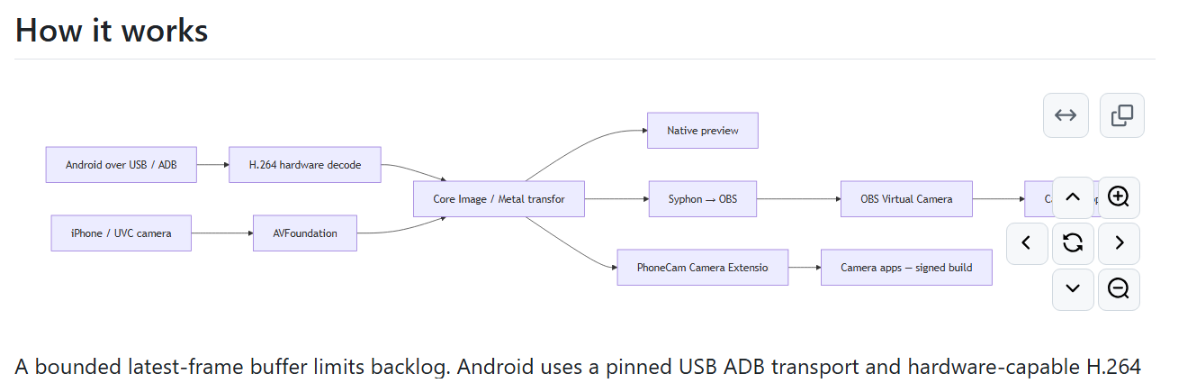
Three capture paths: Android over USB uses the official scrcpy camera server for H.264, handed to VideoToolbox for hardware decoding; phones whose vendor exposes Webcam mode go through native UVC; iPhone XR and later use Continuity Camera. All three share the same commands and processing pipeline, so switching phones does not mean switching tools.
Native live preview: A single phonecam preview opens a real preview window, so you can check orientation, framing and smoothness before pushing video anywhere, instead of guessing inside a meeting app.
Video transforms: Rotate, mirror horizontally, crop, and fill or letterbox the output. With the phone mounted above your desk for documents or product close-ups, a --rotate 90 straightens the frame instead of you rearranging the hardware.
OBS integration: Processed GPU frames are shared with OBS through Syphon, and OBS publishes them as a system camera via its virtual camera. Your meeting app just picks it from the camera list, and this route needs no screen-recording permission.
CLI controls: Pick 640×480, 1280×720 or 1920×1080, frame rates of 15, 24, 25, 30 or 60fps, plus bitrate and front or rear camera. The default is 720p30. Put the flags in a script and the next call restores the exact same setup.
Diagnostics: phonecam doctor lists permissions, devices and extension status in one shot, while phonecam probe runs for a set duration and reports captured versus processed frame counts as JSON. When something drops out, you can tell whether the cable, the ADB authorization or the decoder is at fault.
Verifiable dependencies: The setup script pulls the official scrcpy-server 3.3.4 and checks it against a SHA-256 pinned in the repository, so the binary cannot be quietly swapped for something else.
PhoneCam puts that idle phone to work as your Mac's camera. Android connects over a USB cable through ADB, iPhone goes through Apple's Continuity Camera, and every frame is decoded and processed on your own machine — no virtual microphone, no recording, no cloud relay. Android capture needs neither root nor a separately installed companion APK.
It is a macOS 13+ developer preview distributed as source you build yourself. The path that has been verified end to end is Android USB to PhoneCam to the OBS Virtual Camera to a receiving app; the iPhone and UVC backends are written but still awaiting hardware validation. MIT licensed.
Features
Three capture paths: Android over USB uses the official scrcpy camera server for H.264, handed to VideoToolbox for hardware decoding; phones whose vendor exposes Webcam mode go through native UVC; iPhone XR and later use Continuity Camera. All three share the same commands and processing pipeline, so switching phones does not mean switching tools.
Native live preview: A single phonecam preview opens a real preview window, so you can check orientation, framing and smoothness before pushing video anywhere, instead of guessing inside a meeting app.
Video transforms: Rotate, mirror horizontally, crop, and fill or letterbox the output. With the phone mounted above your desk for documents or product close-ups, a --rotate 90 straightens the frame instead of you rearranging the hardware.
OBS integration: Processed GPU frames are shared with OBS through Syphon, and OBS publishes them as a system camera via its virtual camera. Your meeting app just picks it from the camera list, and this route needs no screen-recording permission.
CLI controls: Pick 640×480, 1280×720 or 1920×1080, frame rates of 15, 24, 25, 30 or 60fps, plus bitrate and front or rear camera. The default is 720p30. Put the flags in a script and the next call restores the exact same setup.
Diagnostics: phonecam doctor lists permissions, devices and extension status in one shot, while phonecam probe runs for a set duration and reports captured versus processed frame counts as JSON. When something drops out, you can tell whether the cable, the ADB authorization or the decoder is at fault.
Verifiable dependencies: The setup script pulls the official scrcpy-server 3.3.4 and checks it against a SHA-256 pinned in the repository, so the binary cannot be quietly swapped for something else.