Description
CapCut is comfortable to use, but a few things come with it: templates behind a membership, a watermark on the export, a sign-in before you start, and caption recognition that uploads your audio. Cutting one throwaway short costs you an account, a subscription and an upload.
Concat aims to be that editor with those parts removed: multi-track timelines, splitting, trimming, merging, transitions and speed changes are all there, but with no sign-in, no subscription, no watermark on export, and everything running on your own machine.
The most practical piece is automatic captions — recognition happens locally and the audio never leaves the computer. For talking-head videos, interviews and tutorials, that saves a great deal of typing without handing unreleased footage to anyone. An edit you have set up can also be saved as a template and applied to the next video.
A Rust engine sits underneath a native interface, with FFmpeg for decoding and whisper.cpp for speech recognition. **It is currently a pre-release Beta**, so features are still landing and rough edges are expected — worth watching rather than relying on. The licence is AGPL-3.0, strong copyleft, so redistributing something built on it means opening the source too.
Multi-track timeline: Video and audio stack across several tracks, and a project can hold more than one timeline, which leaves room for more involved edits.
The usual cutting tools: Split, trim, merge, transitions and speed control are all present, so routine work does not send you to another application.
Local automatic captions: Speech recognition runs on the machine with no upload, which removes most of the typing from talking-head and interview content.
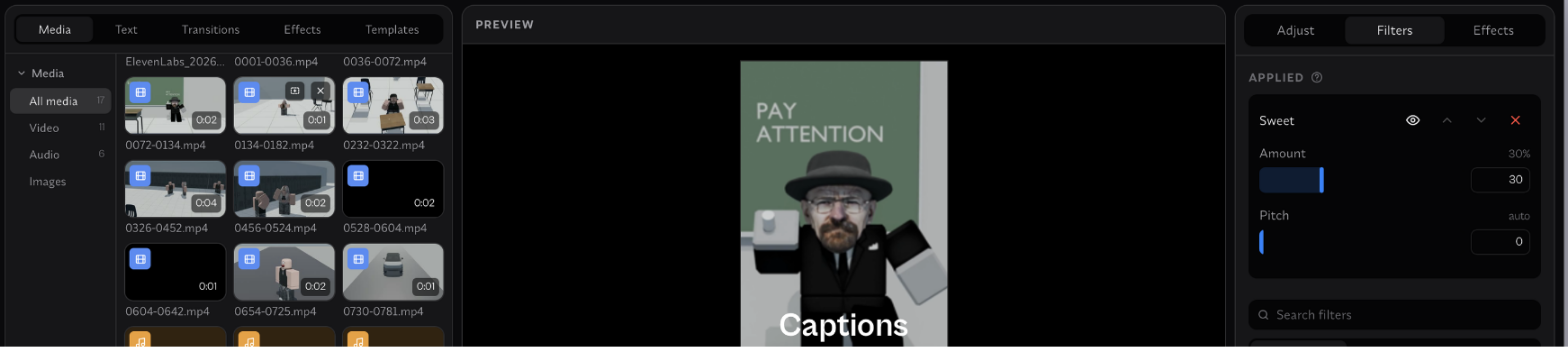
Text and filters: Titles, text layers, filters and effects are applied directly, with parameters adjusted in the side panel and previewed live.
Reusable templates: A finished edit can be saved as a template and applied to the next video, which suits series content with a fixed format.
No watermark, no account: Exports carry no watermark, no registration is required, and nothing is locked behind a paywall.
Cross-platform desktop builds: Prebuilt desktop downloads are published on the Releases page, so there is no need to compile it yourself.
Concat aims to be that editor with those parts removed: multi-track timelines, splitting, trimming, merging, transitions and speed changes are all there, but with no sign-in, no subscription, no watermark on export, and everything running on your own machine.
The most practical piece is automatic captions — recognition happens locally and the audio never leaves the computer. For talking-head videos, interviews and tutorials, that saves a great deal of typing without handing unreleased footage to anyone. An edit you have set up can also be saved as a template and applied to the next video.
A Rust engine sits underneath a native interface, with FFmpeg for decoding and whisper.cpp for speech recognition. **It is currently a pre-release Beta**, so features are still landing and rough edges are expected — worth watching rather than relying on. The licence is AGPL-3.0, strong copyleft, so redistributing something built on it means opening the source too.
Features
Multi-track timeline: Video and audio stack across several tracks, and a project can hold more than one timeline, which leaves room for more involved edits.
The usual cutting tools: Split, trim, merge, transitions and speed control are all present, so routine work does not send you to another application.
Local automatic captions: Speech recognition runs on the machine with no upload, which removes most of the typing from talking-head and interview content.
Text and filters: Titles, text layers, filters and effects are applied directly, with parameters adjusted in the side panel and previewed live.
Reusable templates: A finished edit can be saved as a template and applied to the next video, which suits series content with a fixed format.
No watermark, no account: Exports carry no watermark, no registration is required, and nothing is locked behind a paywall.
Cross-platform desktop builds: Prebuilt desktop downloads are published on the Releases page, so there is no need to compile it yourself.