Description
< #Voice Dictation #Speech to Text #Local First #Privacy #macOS #Developer Tools #Open Source
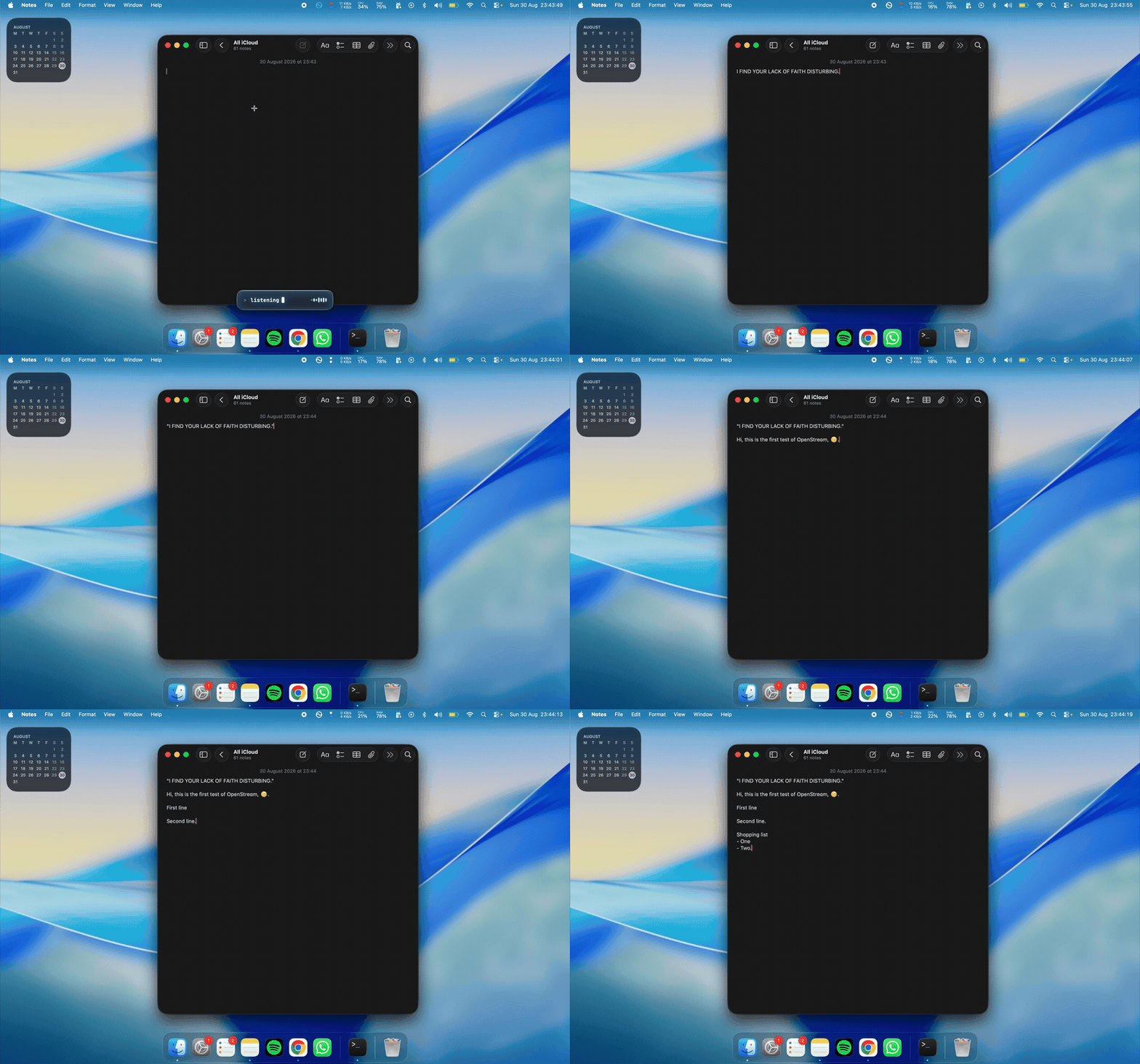
OpenStream is a voice dictation app for macOS aimed at developers, and it comes down to a single gesture: hold the hotkey, talk, let go, and the words land right at your cursor. Transcription runs entirely on the Mac’s Neural Engine — no account, no subscription, and your audio never leaves the machine.
The developer focus shows up in the details. Before it acts on a spoken line break, the app checks which application you are in, so a dictated newline cannot fire off a half-typed terminal command or send an unfinished message. Cleanup is deliberately kept away from language models too: punctuation and formatting go through a deterministic rules engine, a decision the author recorded in an architecture decision record, on the grounds that no model should quietly rewrite what you said. It is in beta, needs Apple Silicon and macOS 14 or newer, and is MIT licensed.
Hold to talk: Hold the hotkey to record, release to end and inject the result into whatever field has focus — no window switching and no copy-paste, whether you are writing code, notes or a reply.
Fully local transcription: NVIDIA’s Parakeet model runs through FluidAudio on the Apple Neural Engine and stays loaded to keep latency down. A roughly 470MB model downloads on first launch; after that nothing needs a network.
Rules engine for cleanup: Punctuation and formatting are handled by deterministic rules rather than a model rewrite, so what comes out is still the sentence you spoke.
Paragraph detection: For longer dictations a small local model decides where the breaks belong. It returns sentence numbers only and never returns any text, so it cannot alter your words.
Context-aware line breaks: Before performing a spoken line break the app checks the frontmost application, avoiding an accidental submit in a terminal or a chat window.
Process isolation: The hotkey listener and the text injector are separate Swift processes, so a stuck Accessibility call cannot take the shortcut down with it.
Free, no account: Where comparable commercial tools want a subscription and a sign-in, this one is free, needs no registration, and has no server side at all.
Building from source: The supported path is git clone, npm install, npm start — the install compiles three Swift helpers. An unsigned DMG exists on the releases page but Gatekeeper will object. First run needs Microphone, Input Monitoring and Accessibility permissions, and the app reports which are missing.
Open source project: The source code is hosted on GitHub, so developers can study the implementation, contribute, or customize it for their own needs.
OpenStream is a voice dictation app for macOS aimed at developers, and it comes down to a single gesture: hold the hotkey, talk, let go, and the words land right at your cursor. Transcription runs entirely on the Mac’s Neural Engine — no account, no subscription, and your audio never leaves the machine.
The developer focus shows up in the details. Before it acts on a spoken line break, the app checks which application you are in, so a dictated newline cannot fire off a half-typed terminal command or send an unfinished message. Cleanup is deliberately kept away from language models too: punctuation and formatting go through a deterministic rules engine, a decision the author recorded in an architecture decision record, on the grounds that no model should quietly rewrite what you said. It is in beta, needs Apple Silicon and macOS 14 or newer, and is MIT licensed.
Features
Hold to talk: Hold the hotkey to record, release to end and inject the result into whatever field has focus — no window switching and no copy-paste, whether you are writing code, notes or a reply.
Fully local transcription: NVIDIA’s Parakeet model runs through FluidAudio on the Apple Neural Engine and stays loaded to keep latency down. A roughly 470MB model downloads on first launch; after that nothing needs a network.
Rules engine for cleanup: Punctuation and formatting are handled by deterministic rules rather than a model rewrite, so what comes out is still the sentence you spoke.
Paragraph detection: For longer dictations a small local model decides where the breaks belong. It returns sentence numbers only and never returns any text, so it cannot alter your words.
Context-aware line breaks: Before performing a spoken line break the app checks the frontmost application, avoiding an accidental submit in a terminal or a chat window.
Process isolation: The hotkey listener and the text injector are separate Swift processes, so a stuck Accessibility call cannot take the shortcut down with it.
Free, no account: Where comparable commercial tools want a subscription and a sign-in, this one is free, needs no registration, and has no server side at all.
Building from source: The supported path is git clone, npm install, npm start — the install compiles three Swift helpers. An unsigned DMG exists on the releases page but Gatekeeper will object. First run needs Microphone, Input Monitoring and Accessibility permissions, and the app reports which are missing.
Open source project: The source code is hosted on GitHub, so developers can study the implementation, contribute, or customize it for their own needs.