Description
Ask an AI for an architecture diagram and you usually get the same thing back: rounded grey boxes wired together by an auto-layout engine, in colors that match nothing on your site. To get something publishable you either spend half an hour in Figma or quietly drop the diagram altogether.
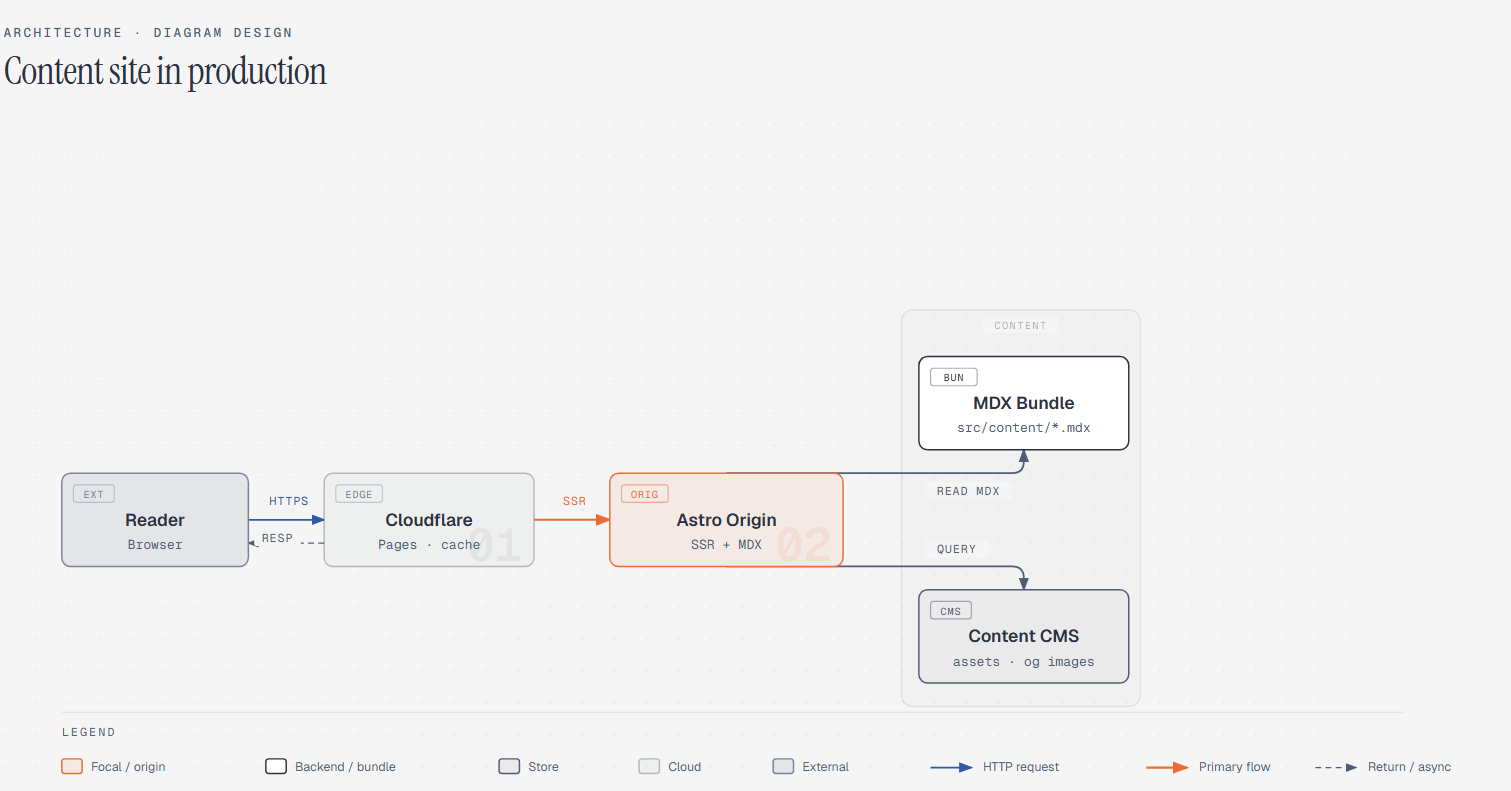
diagram-design is a skill package you install into Claude Code, Codex, Factory Droid or Pi. After that, the diagrams it draws come out as 39 editorial layout types — self-contained HTML with inline SVG, no shadows, no generic rounded boxes, ready to open in a browser or screenshot straight into a post. Target density is 4 out of 10: every node has to earn its place, and the accent color is reserved for the one or two things the reader should look at first.
The step that saves the most time is brand onboarding. Tell it to onboard diagram-design to your site and it reads your homepage, extracts the palette and font stack, and maps them onto semantic roles — paper, ink, muted, accent. From then on every diagram wears your colors and your typefaces. MIT licensed.
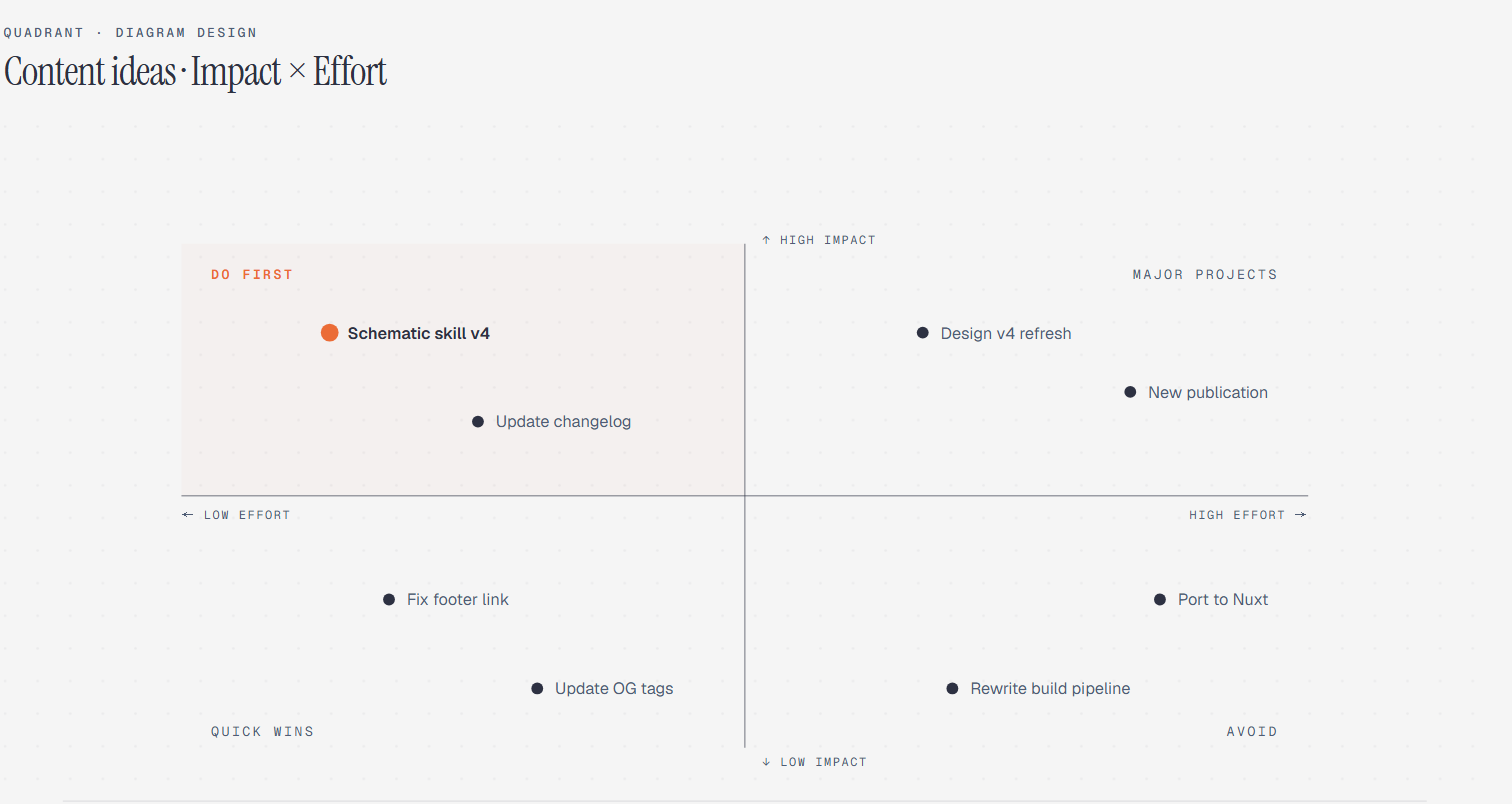
39 diagram types: architecture, flowchart, sequence, state machine, ER data model, timeline, swimlane, quadrant, radar, flywheel, tree and org chart, with Sankey, fishbone, Wardley map, kanban, user journey, deployment, dependency graph, UML class, story map and database schema added since 2.5. Each ships in three static variants: minimal light, minimal dark and full editorial.
Brand extraction from your site: the body background becomes the diagram's paper, your text color becomes ink, your CTA color becomes the accent, your h1 family becomes the title font, your code font becomes the sublabel font. Before anything is written, WCAG AA contrast is verified; a color that fails at 9–12px diagram sizes gets a proposed adjustment and an explanation. Every run ends with a fidelity receipt listing sampled URLs, font sources and any fallback.
Redraw from draw.io and Mermaid: point it at a drawio file — including the compressed .drawio.png and .drawio.svg containers — an mmd file, or fenced mermaid blocks in Markdown, and it redraws them in this design system. It parses text only: no rendering, no JavaScript, no network, no followed links.
Four output dials: format picks HTML, SVG or PNG; size runs from inline-doc to 16:9 slide, social card and A4 landscape, and it sets the type ramp too, so a projected slide gets 16px node names instead of a cramped 12px; detail trims nodes down a fixed ladder — decorations first, then duplicates, then leaf clusters; audience changes wording rather than count, so one node reads "Auth Service / JWT · RS256" for engineers and "Sign-in" for executives.
Fidelity ledger: every import ends by spelling out which nodes were merged, which decision collapsed into an edge label, which orphaned sticky note was dropped, and which path survived intact. You know the source, so you would spot the gaps anyway — better to state them.
Accessible by default: each diagram's inline SVG carries role="img", a resolving aria-labelledby, and title and desc slots. IDs are prefixed per diagram and variant, so several exported SVGs can sit inline on one page without duplicate accessible names, while decorative icons are hidden from assistive technology.
Static first, motion optional: ordinary output is static, script-free HTML. Motion — reveal, step and loop — is only enabled for ordered explanations and must include a complete static first frame; with reduced-motion set, the output falls back to that frame and hides the playback controls.
Install it in whichever agent you use: Claude Code takes it through /plugin marketplace add, Codex through codex plugin, Factory Droid through droid plugin, and Pi is supported too. Exporting to PNG or SVG is a single slash command, with a scale factor when you need slide-resolution output.
diagram-design is a skill package you install into Claude Code, Codex, Factory Droid or Pi. After that, the diagrams it draws come out as 39 editorial layout types — self-contained HTML with inline SVG, no shadows, no generic rounded boxes, ready to open in a browser or screenshot straight into a post. Target density is 4 out of 10: every node has to earn its place, and the accent color is reserved for the one or two things the reader should look at first.
The step that saves the most time is brand onboarding. Tell it to onboard diagram-design to your site and it reads your homepage, extracts the palette and font stack, and maps them onto semantic roles — paper, ink, muted, accent. From then on every diagram wears your colors and your typefaces. MIT licensed.
Features
39 diagram types: architecture, flowchart, sequence, state machine, ER data model, timeline, swimlane, quadrant, radar, flywheel, tree and org chart, with Sankey, fishbone, Wardley map, kanban, user journey, deployment, dependency graph, UML class, story map and database schema added since 2.5. Each ships in three static variants: minimal light, minimal dark and full editorial.
Brand extraction from your site: the body background becomes the diagram's paper, your text color becomes ink, your CTA color becomes the accent, your h1 family becomes the title font, your code font becomes the sublabel font. Before anything is written, WCAG AA contrast is verified; a color that fails at 9–12px diagram sizes gets a proposed adjustment and an explanation. Every run ends with a fidelity receipt listing sampled URLs, font sources and any fallback.
Redraw from draw.io and Mermaid: point it at a drawio file — including the compressed .drawio.png and .drawio.svg containers — an mmd file, or fenced mermaid blocks in Markdown, and it redraws them in this design system. It parses text only: no rendering, no JavaScript, no network, no followed links.
Four output dials: format picks HTML, SVG or PNG; size runs from inline-doc to 16:9 slide, social card and A4 landscape, and it sets the type ramp too, so a projected slide gets 16px node names instead of a cramped 12px; detail trims nodes down a fixed ladder — decorations first, then duplicates, then leaf clusters; audience changes wording rather than count, so one node reads "Auth Service / JWT · RS256" for engineers and "Sign-in" for executives.
Fidelity ledger: every import ends by spelling out which nodes were merged, which decision collapsed into an edge label, which orphaned sticky note was dropped, and which path survived intact. You know the source, so you would spot the gaps anyway — better to state them.
Accessible by default: each diagram's inline SVG carries role="img", a resolving aria-labelledby, and title and desc slots. IDs are prefixed per diagram and variant, so several exported SVGs can sit inline on one page without duplicate accessible names, while decorative icons are hidden from assistive technology.
Static first, motion optional: ordinary output is static, script-free HTML. Motion — reveal, step and loop — is only enabled for ordered explanations and must include a complete static first frame; with reduced-motion set, the output falls back to that frame and hides the playback controls.
Install it in whichever agent you use: Claude Code takes it through /plugin marketplace add, Codex through codex plugin, Factory Droid through droid plugin, and Pi is supported too. Exporting to PNG or SVG is a single slash command, with a scale factor when you need slide-resolution output.