Description
Drawing a standard part like a flange is rarely hard because of the shape — it is hard because of the software. You need to know which workbench to enter, how to constrain the sketch, how to pattern the bolt holes, whether changing a parameter will break the model. Learning CAD for the sake of one part is where most people stop.
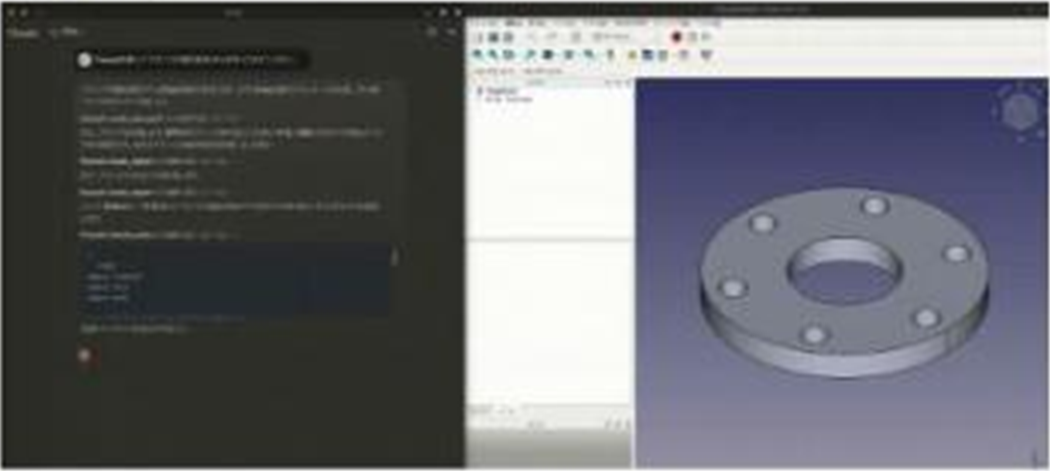
freecad-mcp connects FreeCAD to an AI client such as Claude. Once it is installed you say "make a flange with six bolt holes" and the model goes into FreeCAD itself — creating the document, building the solid, cutting the holes, adjusting parameters.
What sets it apart from having a model blindly write a Python script is that **after each step it sends a screenshot of the current FreeCAD view back to the model**. The model sees what it just produced, notices that a hole is off or a face is wrong, and keeps adjusting — rather than emitting code and walking away.
It goes one step further into simulation: `run_fem_analysis` runs the CalculiX solver and returns the maximum von Mises stress, maximum displacement and node count, which means "will this part hold up under load" is also a question it can act on.
Modelling by conversation: Describe what you want and the model calls create, edit and delete actions that operate inside FreeCAD for real, rather than handing you code to run yourself.
A view returned at every step: Each operation sends back a capture of the current view for the model to judge against and correct from; the camera angle and whether an image is attached are both settable per call.
Arbitrary Python: A direct channel into FreeCAD’s Python environment stays open, so anything the named actions do not cover can still be scripted.
Parts library: Ready-made standard parts can be inserted straight from FreeCAD’s official parts library instead of modelling every bolt and nut from scratch.
Finite element analysis: CalculiX is run against an existing FEM analysis and returns a summary of maximum von Mises stress, maximum displacement and node count, creating a solver automatically if the analysis has none.
2D drawing to 3D model: A two-dimensional drawing can be given as input for the model to build the corresponding three-dimensional part from.
Remote connections: FreeCAD and the MCP server need not sit on the same machine, so running FreeCAD on a workstation while the AI client runs on a laptop is supported.
freecad-mcp connects FreeCAD to an AI client such as Claude. Once it is installed you say "make a flange with six bolt holes" and the model goes into FreeCAD itself — creating the document, building the solid, cutting the holes, adjusting parameters.
What sets it apart from having a model blindly write a Python script is that **after each step it sends a screenshot of the current FreeCAD view back to the model**. The model sees what it just produced, notices that a hole is off or a face is wrong, and keeps adjusting — rather than emitting code and walking away.
It goes one step further into simulation: `run_fem_analysis` runs the CalculiX solver and returns the maximum von Mises stress, maximum displacement and node count, which means "will this part hold up under load" is also a question it can act on.
Features
Modelling by conversation: Describe what you want and the model calls create, edit and delete actions that operate inside FreeCAD for real, rather than handing you code to run yourself.
A view returned at every step: Each operation sends back a capture of the current view for the model to judge against and correct from; the camera angle and whether an image is attached are both settable per call.
Arbitrary Python: A direct channel into FreeCAD’s Python environment stays open, so anything the named actions do not cover can still be scripted.
Parts library: Ready-made standard parts can be inserted straight from FreeCAD’s official parts library instead of modelling every bolt and nut from scratch.
Finite element analysis: CalculiX is run against an existing FEM analysis and returns a summary of maximum von Mises stress, maximum displacement and node count, creating a solver automatically if the analysis has none.
2D drawing to 3D model: A two-dimensional drawing can be given as input for the model to build the corresponding three-dimensional part from.
Remote connections: FreeCAD and the MCP server need not sit on the same machine, so running FreeCAD on a workstation while the AI client runs on a laptop is supported.